
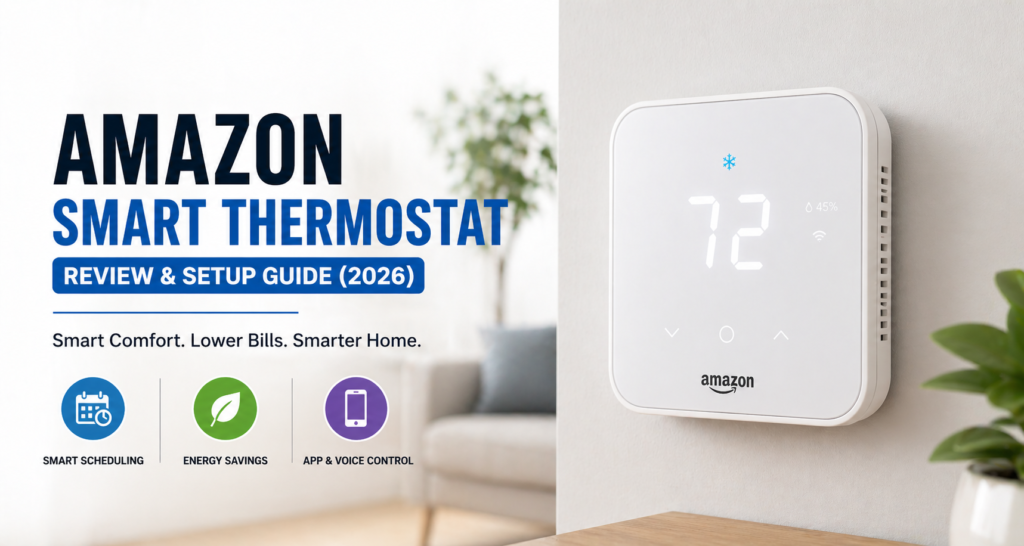
The Amazon Smart Thermostat is a budget-friendly smart home upgrade for homeowners looking to improve temperature control and potentially reduce energy costs. It offers features such as smart scheduling, remote control, and automation at a lower price than many premium options.
With popular brands like Nest and Ecobee often costing more, Amazon’s thermostat provides an affordable alternative for households that want essential smart features without a premium price.
In this review, we’ll cover the key features, pros and cons, compatibility, setup process, energy-saving capabilities, and overall value. We’ll also look at whether the Amazon Smart Thermostat is worth buying in 2026 and who it’s best suited for.
Table of Contents
What Is the Amazon Smart Thermostat❔
Amazon’s Smart Thermostat is the smart home device that the firm is making available in the climate control market segment. It is specifically targeted at the consumers who want a smart thermostat without spending a premium price on it. The Amazon Smart Thermostat is a wifi thermostat that comes in Amazon’s growing range of smart home devices.
The reason why this particular smart home device stands out from the rest is because of its straightforward nature. While other companies make sure that their products offer the consumer features such as room sensors, learning algorithms, and more than one temperature zones, the Amazon’s thermostat provides just basic features like temperature control and voice command through Alexa.
When contrasted against the Google Nest Learning Thermostat, which is priced above $200, or even the Ecobee Smart Thermostat Premium at approximately $250, the price range for Amazon’s version is below $100. This price point makes it perfect for beginners to smart thermostats or customers looking to outfit several zones while keeping expenses low.
The product is targeted at users who have simple houses and normal HVAC systems. In case you have such a system and you are using the Amazon ecosystem for your smart home appliances, the product fits your setup perfectly. But if you are on the lookout for additional functionality such as occupancy detection or room-by-room temperature regulation, then there are other choices available.
For official specifications and updates, you can visit the Amazon product page.
Key Features & Specifications
🔥Core Features
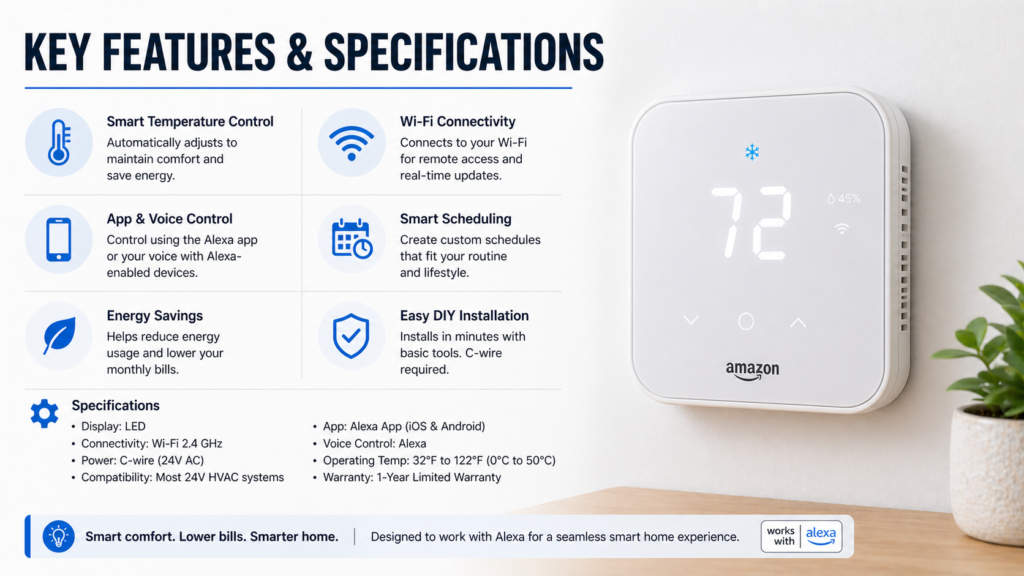
All of the basic features required in a smart wifi thermostat are available on the Amazon Smart Thermostat. The most important of them would be scheduling which allows one to have different temperatures at different times of the day and week. For instance, We found it very helpful for cutting energy costs during those hours when no one is home at work.
It goes without saying that voice control using Alexa is absolutely flawless. Basic commands such as “Alexa, set the temperature to 72 degrees” and “Alexa, turn down the heat” work perfectly. The interaction with the product is seamless because both devices were produced by the same manufacturer.
In terms of saving energy, there are plenty of useful modes included in the device. It offers features such as auto-switching between the cooling and heating mode and the ability to learn your routine and provide recommendations on how to save more energy. However, compared to Nest, it does not learn as well as the latter one.
With mobile app control via the Alexa app, you have full remote access to your thermostat regardless of where you are – whether you are working, traveling, etc.
The HVAC systems that are compatible include most standard systems like gas, electric, oil, and heat pump. However, this is ideal for single-stage systems only; therefore, if you have any kind of multizone system or geothermal, then it’s probably not for you.
Technical Specs
The required network is the 2.4 GHz Wi-Fi (5GHz isn’t compatible, which may limit use for some customers). The supported voltage range is 24V and includes all residential HVAC installations.
A requirement that may surprise many potential buyers is the mandatory C-wire, as not all smart thermostats are able to operate without it. This thermostat by Amazon needs it for proper operation and if the current installation uses no C-wire, then it will have to be installed.
Design & Build Quality
This thermostat adopts a minimalist style of design which may suit your taste of home décor perfectly or you may consider it as very basic in terms of design. Rectangular shaped device with rounded corners will hardly become anyone’s choice in terms of the award-winning design, but it will fit almost in any décor of your home.
The LED screen display is very clear and shows the current temperature, set temperature and system status. The device’s body is made from durable white plastic; it is quite solid, however, it does not contain such sophisticated materials as expensive models. Touch screen reacts to your commands in a good way, but it is not as smooth as in some of high-end products.
After mounting to the wall, the device becomes flush to the surface. The size of the device is compact to fit almost any place of your wall.
Of course, it’s nowhere near as fancy as the Honeywell Home T9 Smart Thermostat, which has a more advanced color touch screen and metallic design elements, but in comparison to other similar devices, this Amazon one looks definitely more modest. But it has been proven to work quite well for many people, who don’t care about the extravagant design.
The build quality is impressive for its price. The display, controls, and overall construction feel solid, making the Amazon Smart Thermostat a well-built option for budget-conscious buyers.
App & Smart Home Integration
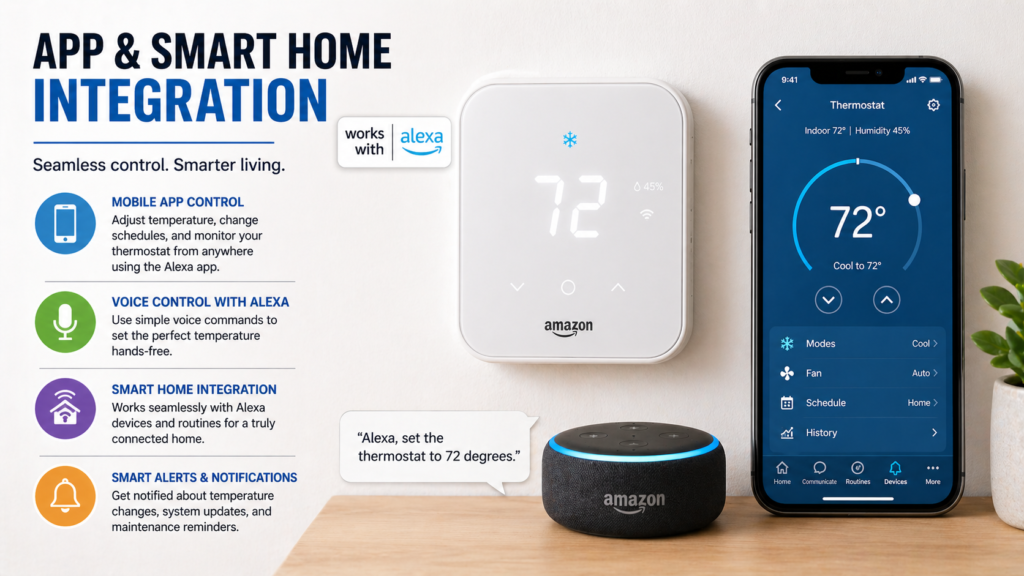
Integration with the Amazon Alexa platform makes the Amazon Smart Thermostat very convenient. It is both an advantage and the most significant drawback of this product. In case you are used to using the Amazon smart home platform, the integration with it goes smoothly and easily. All the controls are made within the usual Alexa application, without the necessity to install any additional app.
Smart home automation possibilities are the best feature of such integration. You may set up routines which include changing temperature in accordance with other actions – for example, decrease temperature in case your smart lights are turned off at bedtime or increase it upon recognition of you speaking “good morning” near your Echo device.
All the possible controls of your thermostat from the app are represented here. You can change your temperature settings, alter your schedule or get notifications regarding your thermostat. Scheduling interface is quite simple to use. You can set different temperatures for weekdays and weekends as well as for different periods of the day.
On the other hand, if you do not rely heavily on Amazon Alexa’s ecosystem, this integration is not so interesting to you. In this case, the device will not be compatible with the Google Assistant or Apple HomeKit, making it not so attractive for their users. And here Ecobee and similar devices have an advantage.
Alerts via mobile application tell you about all relevant information regarding your HVAC system, such as the need for maintenance or connection problems. They can be helpful, but still, they cannot give you the same level of diagnostic information as some other systems do.
Performance & Real-World Usage
Amazon Smart Thermostat performs adequately given the low cost of the device. Temperature measurements are mostly accurate, and the device offers good heat and cold distribution throughout the day.
The use of 2.4GHz Wi-Fi means that the product is compatible with almost all systems and that there may be some disruptions due to network congestion. Automatic reconnection helps overcome any connectivity problems.
Voice commands using the Alexa application work effectively; however, some delays may be experienced based on network conditions.
Control of heating and cooling is efficient since there are temperature adjustments and switch between heating and cooling when such option is supported by the HVAC system.
The only drawback of this thermostat is that it has a temperature sensor only in one place. While premium models have several room sensors or even the capability of occupant detection, Amazon model doesn’t provide such options.
Despite that, Amazon Smart Thermostat allows reliable climate regulation and has all necessary smart options.
Energy Savings & Cost Efficiency
The Amazon Smart Thermostat is able to save money for customers using its schedule and temperature settings wisely. The exact amount of savings will depend on such parameters as weather conditions, efficiency of the heating system, home insulation, price of electricity, and temperature settings.
Effective schedule will help you save on the unnecessary cooling or heating of the premises because it will set different temperatures when the house is unoccupied or people sleep at night. Automated adjustment of the temperature settings also prevents you from forgetting to change the settings manually.
Utility companies usually provide smart thermostat rebates, which will allow you to reduce the initial price. It is recommended to find out about the possible rebates in your area before buying the product.
On the whole, the Amazon Smart Thermostat can be a profitable choice for replacing the usual thermostat.
Step-by-Step Setup Guide
📝Pre-Installation Checklist
Before you begin the installation process of the Amazon Smart Thermostat, get ready with a screwdriver, wire strippers, drill if required, and a phone for setting up the application.
It is always better to check the wiring of your old thermostat prior to the installation process of the new one. This is because the Amazon Smart Thermostat needs a C-wire, and thus, your HVAC should have compatible wiring.
Further, ensure that the power supply to the HVAC system is turned off before you start working on your thermostat wiring.
⚙️Installation Steps
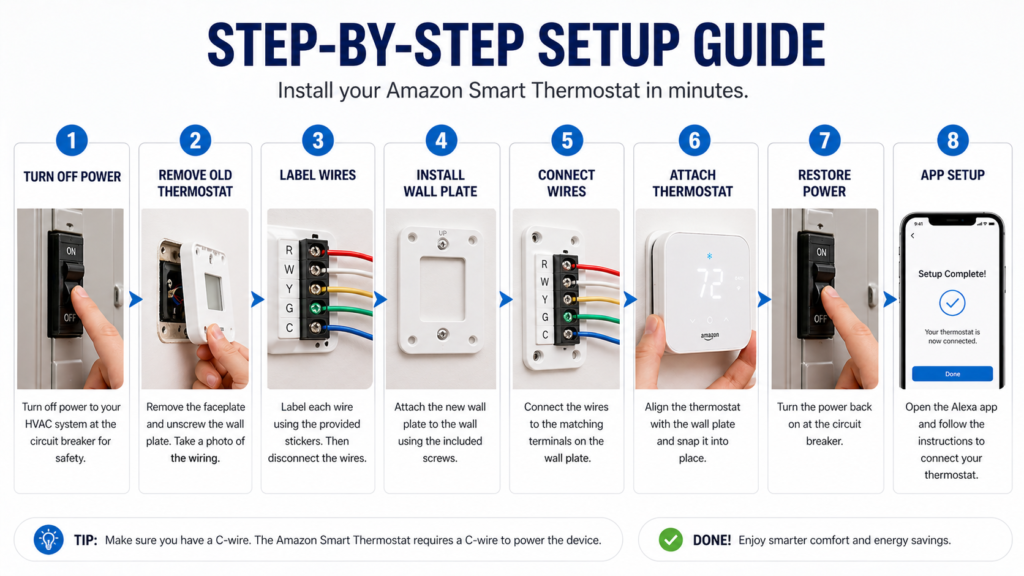
The first thing to do is to turn off power supply to the heating and air conditioning unit. Make sure it is turned off by checking the functionality of the old thermostat. You should find that no matter what adjustments you make, there will be no reaction.
Take the old thermostat and remove it from the wall. Unscrew the faceplate of the old thermostat. Make sure you have taken a photo of the current wiring to have it as an extra help in case of trouble during replacement process.
Label each wire in accordance with the terminal connection (R, W, Y, G, C, etc.). Amazon provides labels for the wires in the packaging box. All of them have to be disconnected from the old thermostat and the mounting plate has to be removed from the wall.
Mount the new mounting plate on the wall using the screws supplied in the box. In case you need to install it on drywall without a stud, take care of choosing the right anchors for the wall. Mounting plate should be installed horizontally.
Connect all wires with the corresponding terminals of the new mounting plate in accordance with their labels. They should be matched with the terminals marked on the mounting plate of Amazon thermostat. Connect all the wires securely to avoid malfunction of your heating and air conditioning unit.
Finally, attach the thermostat itself to the mounting plate. It should be firmly connected. After installation of the thermostat, turn on the power supply to the heating and air conditioning system.
📱App Setup
Download the Amazon Alexa app if you don’t already have it installed. The thermostat setup is handled entirely through this app, so you won’t need any additional software.
Follow the in-app instructions to connect your thermostat to your WiFi network. Make sure you’re connecting to a 2.4 GHz network, as the thermostat doesn’t support 5 GHz connections. The app will guide you through entering your network credentials and establishing the connection.
Once connected to WiFi, sync the thermostat with your Alexa account. This enables voice control and integration with other smart home devices. Test the connection by asking Alexa to report the current temperature or adjust the setting.
Configure your basic settings including temperature preferences, schedule, and notification preferences. The app provides helpful suggestions for energy-efficient schedules based on common usage patterns.
For more detailed installation guidance, you might want to check out resources like “How to Install a Smart Thermostat” which covers general installation principles that apply to most smart thermostat models.
Pros and Cons
✅Pros
- Affordable price: Priced below $100, the Amazon Smart Thermostat is cheaper compared to other premium brands yet provides key features of a smart thermostat.
- Easy installation: With proper labeling and instructions, the Amazon Smart Thermostat installation process is fairly easy for users familiar with basic wiring.
- Alexa integration: Seamless integration with Alexa for both voice control and smart home routines.
❌Cons
- Requires a C-wire: In homes where there is no C-wire available, additional wiring or even professional installation will be required, thus raising the total cost.
- Fewer advanced features: It does not have advanced features such as room sensors, learning capacity, or advanced temperature control.
- Limited sensing: This thermostat model does not provide additional room or occupancy sensors.
- Limited ecosystem compatibility: The Amazon Smart Thermostat is only compatible with Alexa and the Amazon smart home ecosystem and might not be preferred by users of Google Home or Apple HomeKit.
Amazon Smart Thermostat vs Competitors
| Feature | Amazon Smart Thermostat | Google Nest Learning Thermostat | Ecobee Smart Thermostat Premium | Honeywell Home T9 Smart Thermostat |
|---|---|---|---|---|
| 💰 Price | Budget ($60–$100) | Premium ($200+) | Premium ($240+) | Mid-range ($150–$200) |
| ⚡ C-Wire Required | ✅ Yes | ❌ Not always | ❌ Optional (with kit) | ❌ Optional |
| 🧠 Learning Ability | ❌ No | ✅ Yes (Auto-learning) | ❌ No | ❌ No |
| 📱 App Control | ✅ Alexa App | ✅ Google Home App | ✅ Ecobee App | ✅ Honeywell App |
| 🎙 Voice Control | ✅ Alexa | ✅ Google Assistant + Alexa | ✅ Alexa + Siri | ✅ Alexa + Google |
| 🌡 Room Sensors | ❌ No | ❌ No | ✅ Yes | ✅ Yes |
| 🔋 Power Options | C-wire only | Battery + C-wire | C-wire / adapter | Battery / C-wire |
| 🏠 Smart Home Integration | Alexa only | Google ecosystem | Alexa, Apple, Google | Alexa + Google |
| ⚙ Installation | Easy | Moderate | Easy | Easy |
| 🎯 Best For | Budget users | Smart automation lovers | Advanced features | Balanced performance |
👉 If you’re on a budget and already use Alexa, the Amazon Smart Thermostat is the best value pick. But if you want advanced features like room sensors and premium automation, consider the Ecobee Smart Thermostat Premium.
Amazon differs from Google Nest Thermostat in that the former uses much simpler controls and does not have any features that would assist automation in temperature settings through learning and scheduling. While the Nest Thermostat may be considered as featuring more options, Amazon offers lower prices that might attract consumers preferring simpler approaches.
There is the ecobee Smart Thermostat Premium that is also superior in terms of functionality offering such options as room sensors, compatibility with various smart homes’ platforms, and more advanced temperature management. Nevertheless, the latter’s high price makes the Amazon product more desirable for homeowners who need only basic features.
The price is one of Amazon’s main strengths as it is generally cheaper than its premium competitors and could get even cheaper when utility rebates apply.
Speaking about the features, there are more advanced ones offered by Amazon competitors, but it still offers necessary ones which most homeowners would require including remote control, scheduling, and compatibility with Alexa.
There is also the question of smart home compatibility as Amazon’s thermostat fits best Alexa users while there are some more general options among Amazon competitors.
Thus, Amazon suits those users who value affordability and simplicity while Nest and ecobee products suit those who want more options.
Who Should Buy This Thermostat?
If you’re on a budget but would still like some smart home features in your thermostat, then Amazon’s Smart Thermostat will be a great option for you.
- People on a budget: A cost-effective replacement for basic thermostats without spending more than $100.
- Small homes or apartments: The basic features suit one-zone heating and cooling very well.
- Alexa owners: If you’re using an Echo device or other Alexa-enabled products, then this product is perfect for you.
- Users who prefer simplicity: Ideal if you only need scheduling, remote access, and voice commands.
Who Should Skip It?
If you have Google Home or Apple Home in your system, then consider going for a thermostat which is compatible with other platforms too.
Smart home enthusiasts: If you need room sensors or multi-zone control, then consider a premium thermostat.
Properties without a C-wire: The installation might be quite challenging for you.
❓FAQs
Does Amazon Smart Thermostat need a C-wire?
Yes, Amazon Smart Thermostat needs a C-wire to work. While some other thermostats do not necessarily require this connection, this particular one must have it installed in order to work. In case your existing thermostat does not have a C-wire connection, you should have it installed.
Is it compatible with all HVAC systems?
Amazon Smart Thermostat is suitable for any standard HVAC system, namely gas, electric, oil, and heat pump systems. Nevertheless, this thermostat works only with single-stage HVAC system and cannot be installed in such complex systems as multi-zone, geothermal and more than five wire systems.
Can I control it remotely?
Yes, you can control your Amazon Smart Thermostat remotely via Amazon Alexa app provided that both your phone and thermostat are connected to the Internet. Remote control is reliable under these conditions.
Does it save electricity?
Amazon Smart Thermostat will allow you to save money on your electricity bill by controlling the temperature in a smart way. Most consumers report that they save 10-15% on their expenses for heating and cooling their homes due to the automated adjustments of the temperature when there is no one in the house.
Is it better than Nest?
It all depends on what matters more to you. The Amazon model is much cheaper, it works very well with Alexa gadgets, while Nest has more sophisticated functions and more appealing design. In terms of functionality of the smart thermostat at a reasonable price, Amazon will be your best bet.
🔗Related Articles
- Best Smart Thermostat 2026 (Complete Buyer’s Guide)
- Smart Thermostat Installation (Step-by-Step Guide)
- Best Smart Thermostats without C Wire (2026 Guide)
- Smart Thermostat Not Turning On? 12 Proven Fixes That Work Instantly (2026 Guide)
- Honeywell Smart Thermostat Review: Shocking Truth – Is It worth It? (2026)
- Sensi Smart Thermostat Review (Budget Pick?) – Honest 2026 Guide
- Best Smart Thermostat Under $150 USA (2026 Guide)
🚀Final Verdict
Amazon Smart Thermostat does its job perfectly in terms of its primary purpose, which is to provide budget-oriented consumers with smart heat and air conditioning management tools. Although the Amazon Smart Thermostat lacks some advanced functions and premium design elements of more expensive products, it possesses the necessary basic features that can satisfy the needs of its consumers.
This product will be very helpful for homeowners who wish to have their first experience with a smart home gadget, especially when using Alexa.
Homeowners who have the traditional compatible HVAC system and seek for a budget-oriented smart thermostat will find this product perfect. However, owners who require additional functions like room sensors, multi-zone control, and smart home integration will most likely prefer another device.
In general, Amazon Smart Thermostat is a good choice for homeowners who seek for a combination of affordability and smart home functionalities.