

Sensi Smart Thermostat is a well-known affordable alternative for consumers that want to get their hands on a smart temperature controller without having to spend money on the high-end model’s features.
Although there are more expensive thermostats available on the market with additional functions, such as the Ecobee Smart Thermostat Premium or Google Nest Learning Thermostat, Sensi is a model that provides the basic functions that people might need.
Since Sensi models cost less than $100, this product might be considered one of the best alternatives for those who want to upgrade to a smart temperature controller but don’t have too much money.
This article will provide an overview of all of the features of Sensi Smart Thermostat, its performance, compatibility with other devices, energy savings capabilities, and pros and cons.
Table of Contents
What Is the Sensi Smart Thermostat?
Sensi Smart Thermostat is made by Emerson, a reputable company known in the HVAC world for more than 130 years. This Sensi series became Emerson’s entry into the world of smart devices and their intention to offer connected products to the everyday household without any complications and extra costs for the premium equipment.
The uniqueness of Sensi is in its affordable prices and the simplicity it offers. Other companies try to impress with complex AI learning algorithms and room sensors, but Sensi focuses only on providing basic capabilities, such as smart scheduling, remote control, and energy monitoring in an affordable price range.
Sensi Smart Thermostat is especially attractive for certain groups of users. For those who are not experienced in using smart home gadgets, Sensi offers a good way to start without big expenses and complicated devices. Those who are trying to save money on household expenses will like that the Sensi gives an opportunity to have energy savings from the thermostat that costs less than $200-300.
Also, it should be mentioned that Sensi Smart Thermostat is very popular among people who enjoy doing things by themselves since this device can be easily installed on your own in about 30 minutes.
You can check full specifications on the official Sensi thermostat page.
Sensi Smart Thermostat Features & Specifications

| Feature | Sensi Smart Thermostat (ST55) | Sensi Lite Smart Thermostat (ST25) | Sensi Touch Smart Thermostat | Sensi Touch 2 Smart Thermostat |
|---|---|---|---|---|
| Price Range | Budget | Budget | Mid-range | Premium |
| Display Type | Basic LCD | Basic LCD | Color Touchscreen | Large Color Touchscreen |
| C-Wire Required | ❌ Not required (most systems) | ❌ Not required (most systems) | ✅ Required | ✅ Required |
| Installation | Easy DIY | Very easy DIY | Moderate | Moderate |
| HVAC Compatibility | Broad (heat pump, multi-stage) | Basic systems | Advanced systems | Advanced systems |
| Smart Features | Scheduling, alerts | Basic scheduling | Scheduling + smart alerts | Advanced scheduling + sensors |
| Room Sensors Support | ❌ No | ❌ No | ❌ No | ✅ Yes |
| Energy Savings | Up to ~23% | Moderate | High | High |
| App Control | ✅ Yes | ✅ Yes | ✅ Yes | ✅ Yes |
| Voice Control | Alexa, Google Assistant | Alexa | Alexa, Google | Alexa, Google |
| Best For | Budget smart upgrade | Cheapest option | Balanced features | Advanced smart homes |
Core Features
The Sensi Smart Thermostat comes with all the necessary features needed from a smart Wi-Fi thermostat. First, this device has Wi-Fi capabilities that allow users to control their heating and cooling via a smartphone application, making remote temperature adjustments possible no matter where you are.
A smart scheduling system enables you to set different temperature ranges during the week and on weekends as well as make automatic adjustments for sleep, home and away times. Moreover, the Sensi application is available for both Android and iOS devices and offers an easy-to-use interface.
Voice control is possible through Amazon Alexa and Google Assistant. In addition, the application gives energy consumption reports that display the heating and cooling behavior but contain information less detailed compared to premium thermostats.
Geofencing allows you to change the temperature automatically depending on your presence at home or not. Geofencing technology utilizes your phone location for detecting your departure and arrival, hence, saving energy on unnecessary heating or cooling of an empty house. This technology works better in case of regular routines.
Technical Specs
Compatibility is another strength of the product. The intelligent home thermostat is compatible with all kinds of regular HVACs, whether it is gas, oil, or electrical heater as well as central air conditioner or heat pump. In this case, the main benefit lies in the fact that no C-wire is necessary for the installation, thus making the process much easier and less problematic than usual.
In terms of using it for home purposes, the thermostat uses battery power as an alternative source of energy. It connects to 2.4 GHz WiFi networks and, therefore, has quite a strong range. I experienced this myself in my two-story house where the router was placed at the opposite end of the building.
Design & Build Quality
The Sensi Smart Thermostat is designed with minimalistic design elements such as smooth lines, and its all-white color fits well within any interior. In contrast to the touch screen that can be found in some of the smart thermostats on the market, Sensi uses physical buttons and digital displays for ease of usage.
The housing of the device is made from light plastic material, whereas the regular backplate enables its safe and simple installation.
Temperature readings displayed on the device are large and clear, making it very simple to control the settings by pushing a few buttons.
In terms of the design of the device, it lacks the luxury look of other high-end smart thermostats like Honeywell Home T9 and Ecobee Smart Thermostat Premium.
App & Smart Home Integration
The Sensi application has a very simple and intuitive interface to set up temperatures, create schedules, and view the energy usage report. Its simple design helps people easily perform any function even if they are not familiar with smart home devices.
Sensi is compatible with Amazon Alexa and Google Home and thus allows you to manage temperature settings, switch to heating/cooling mode, and check current temperature via voice commands.
Furthermore, the Sensi app has the ability to send notifications such as air filter notifications and temperature notifications. Smart home routines may also help to automate temperature setting according to certain activities.
Although the Sensi application does not have a lot of features that are usually available in expensive thermostats, it has basic functions which will be enough for most users.
Sensi Smart Thermostat Performance Review
The Sensi Smart Thermostat has excellent performance capabilities in routine use at home. Consistent temperature control is achieved, as well as fast adjustment via the app interface.
Internet connectivity can be relied upon in the routine work of the device, as it reconnects automatically after the loss of Wi-Fi connection. The automation of the temperature control is facilitated by means of scheduling and geofencing that allow to change the temperature according to one’s daily schedule.
Another positive aspect of the device is its battery that lasts long and informs the user about its condition.
In contrast to the learning thermostats such as Nest, the Sensi Smart Thermostat does not generate schedules for itself automatically.
The consistent heating and cooling can be achieved without any sophisticated technologies used in other devices.
Energy Savings & Cost Efficiency
The Sensi Smart Thermostat may be able to save users money in terms of heating and cooling expenses thanks to its energy-saving capabilities.
- Scheduled automation: The device will automatically change the temperature settings when you sleep or are away from home.
- Geofencing: The ability to detect when you arrive at or depart your house and change the temperature as necessary.
- Energy reports: Will display how long your HVAC system ran for both heating and cooling to show your usage patterns.
- Utility rebates: Energy providers sometimes provide rebates to customers who buy smart thermostats that qualify.
Your savings will differ depending on a variety of factors such as climate, efficiency of your HVAC, insulation, electricity prices, and other settings. Although the Sensi Smart Thermostat does not have the advanced room sensor and learning capabilities like some of the more expensive smart thermostats, it still could be effective.
According to energy saving thermostat tips, smart thermostats can reduce energy bills.
Sensi Smart Thermostat Installation Guide
Pre-Installation
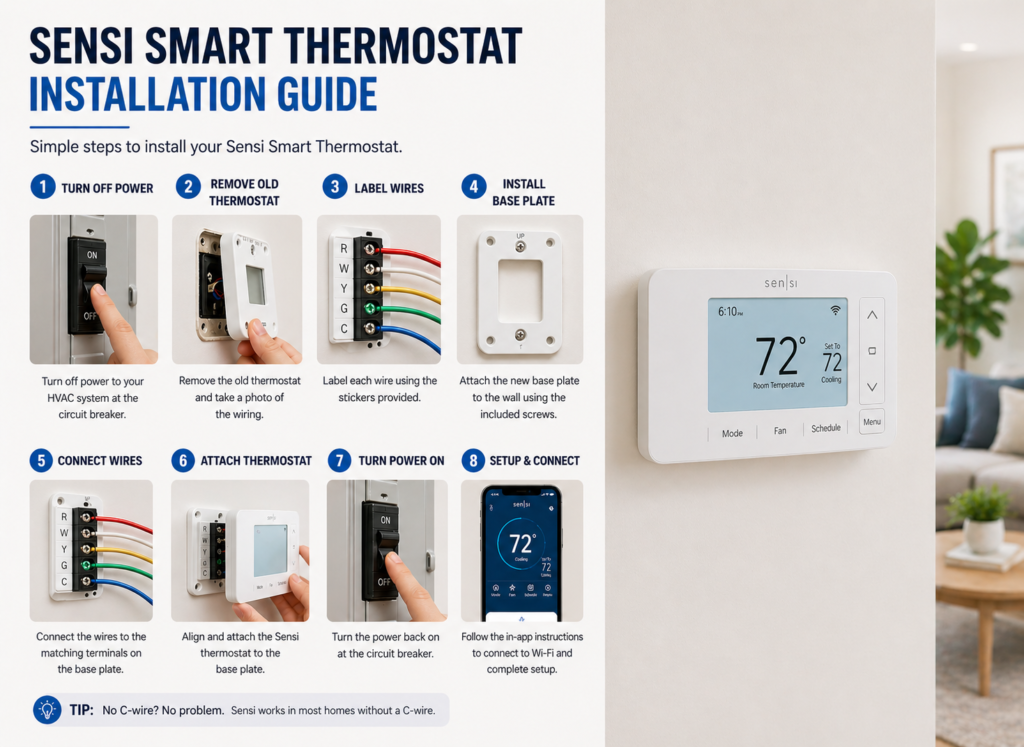
First, make sure that you have your tools handy before proceeding with the installation. This includes a screwdriver (preferably Philips), wire strippers (optional), and your phone which will be used during the app installation. Take a look at your current wiring scheme because the good thing about Sensi is that it does not use a C-wire, hence, should not require you to do extra wiring.
Make sure that the power to your HVAC unit is off prior to the start of the process. The reason behind this is your safety and the protection of your unit from any kind of damage. Take a picture of the wiring scheme before disconnecting any wires.
⚙️Installation Steps
Take out the old thermostat from its position, loosen it from the mounting screws and carefully take off the wires. Mark each wire with respect to the terminal it was attached to (R, W, Y, G, and so forth).
Affix the Sensi base plate on the wall by drilling the holes in case new holes have to be made using the template provided, otherwise, use the old holes. Attach the marked wires to their respective terminals on the Sensi base plate, and there are wiring diagrams in the installation manual for different wiring arrangements.
Insert the Sensi thermostat on the base plate till there is a click sound from it. Insert the batteries and turn on the HVAC system.
📱App Setup
Download Sensi app and create your account. The application will assist you in linking the thermostat with your WiFi network. For that, you’ll have to provide the WiFi password. Set your basic preferences for scheduling and comfort level. If you are going to use voice commands for operating the device, you should connect your Alexa or Google Assistant account in this stage.
Before installing, it’s helpful to understand how a thermostat works.
Pros and Cons
✅ Advantages
Undoubtedly, the affordable pricing represents one of the key benefits of the Sensi smart thermostat. You get a device at the price under $100, which represents less than half of the cost you need to pay for a high-end alternative while providing the necessary features of a smart thermostat. The absence of C-wire requirement makes the installation possible for any property without any special tools and skills.
Simple self-installation takes less than an hour to finish. The compatibility with Alexa and Google Assistant will provide you with voice control option without the need for any additional hub. The battery back-up will save your setting during the power outage while simple interface reduces the learning process for other people in your family.
❌ Disadvantages
This simple design will be not enough for those who prefer high-tech look. Sensi smart thermostat doesn’t have advanced sensors that are needed for room-by-room monitoring and occupancy detection. Limited smart learning features require manual configuration of the schedule.
The energy reporting is not advanced in comparison with its competitors, and there is no integration with the advanced smart home ecosystem besides voice control. Plastic material represents budget-oriented design without premium feel.
Sensi vs Competitors

| Feature | Sensi Smart Thermostat | Google Nest Thermostat | Ecobee Smart Thermostat Premium | Amazon Smart Thermostat |
|---|---|---|---|---|
| Price Range | ~$80–$100 | ~$120–$180 | ~$220–$250 | ~$60–$100 |
| C-wire Required | ❌ No (most systems) | ✅ Yes (recommended) | ✅ Yes | ✅ Yes |
| Learning Features | ❌ None | ✅ AI Learning | ❌ No true AI (smart scheduling only) | ❌ Basic scheduling |
| Room Sensors | ❌ No (except Touch 2 model) | ❌ No (basic Nest) | ✅ Included | ❌ No |
| Voice Control | Alexa, Google | Google, Alexa | Alexa, Google, Siri | Alexa only |
| Installation | ✅ DIY Friendly | ⚠️ Moderate | ❌ Complex | ✅ DIY Friendly |
| Display Type | Basic LCD | Minimalist display | Premium touchscreen | Simple display |
| Energy Savings | Up to ~23% (Sensi) | High (AI optimized) | Very high (sensors + automation) | Moderate |
| Best For | Budget + no C-wire homes | Smart automation lovers | Premium smart homes | Budget Alexa users |
On the other hand, the Google Nest Thermostat can do a lot more learning, but at the same time is more expensive and needs a professional installation process. The Ecobee Smart Thermostat Premium has room sensors and other functions that make it better in terms of efficiency, but it also costs more and is too expensive for normal usage.
The Amazon Smart Thermostat is the most affordable rival of Sensi, but it is also less functional and compatible with fewer devices. Sensi is the best choice in general for those who value functionality and affordability.
Who Should Buy the Sensi Smart Thermostat?
This thermostat represents one of the best choices for cost-conscious users looking for intelligence without paying the premium price for it. The user who buys it for less than $100 and manages to save energy and take advantage of the remote control capability is doing well for themselves. Newbies in terms of smart home technology will love the simple usage and installation that require no sophisticated skills at all.
This thermostat is a great fit for those houses that do not have the C-wire installed because Sensi does not require any extra wiring. Small houses and apartments can enjoy a simple but efficient approach without the need to spend money on unnecessary features such as the multi-sensor rooms.
Sensi will be a poor choice for those people who are seeking to use innovative automation features or incorporate their smart home into this thermostat. Houses with multi-zone climate systems will probably be better off using some premium option with sophisticated sensors and algorithms for learning.
❓FAQs
Does Sensi require a C-wire?
Sensi doesn’t need a C-wire to work because it uses battery power rather than AC supply. This makes it easier to install and saves you from extra electrical work.
Is Sensi better than Nest?
This really depends on what your priorities are. Sensi is better for those who prefer not to spend too much money and those who would like to install it themselves without any help.
Can I control Sensi remotely?
Yes, thanks to the Sensi app you will be able to control your smart thermostat remotely by adjusting its settings and schedules and viewing your energy consumption.
Does it work with Alexa?
Yes, Sensi is compatible with Amazon Alexa and Google Home Assistant. So, you will be able to use voice commands to control your heating and cooling system.
How much energy can it save?
Usually, users experience 10-20% of cost savings on their heating/cooling expenses thanks to smart schedule and geofencing capabilities. But the real energy savings depend on your current habits and costs of energy services in your location.
🔗Related Articles
- Best Smart Thermostat 2026 (Complete Buyer’s Guide)
- Smart Thermostat Installation (Step-by-Step Guide)
- Best Smart Thermostats without C Wire (2026 Guide)
- Smart Thermostat Not Turning On? 12 Proven Fixes That Work Instantly (2026 Guide)
- Honeywell Smart Thermostat Review: Shocking Truth – Is It worth It? (2026)
- Best Smart Thermostat Under $150 USA (2026 Guide)
🚀Final Verdict
Sensi Smart Thermostat is deservedly considered the best budget smart thermostat because of its reliability, the basic set of smart features, real energy-saving capabilities and affordable price. It does not have any complicated AI learning or high-quality materials like expensive brands but provides the basic set of functions that users need to control their houses effectively.
This combination of affordable price, ease of installation and performance make it a perfect choice for a newbie to buy the first smart thermostat or anyone who just wants to try something new. Of course, there are better feature-equipped alternatives but Sensi shows that there is no need to spend a lot of money on such a thing.
Sensi Smart Thermostat is exactly the kind of simple and affordable device that is really worth buying. It is a perfect example of how you can make your life better using an additional gadget without spending a fortune on it.
👉 “If you’re looking for a reliable and affordable option, the sensi smart thermostat is definitely worth considering in 2026.”