
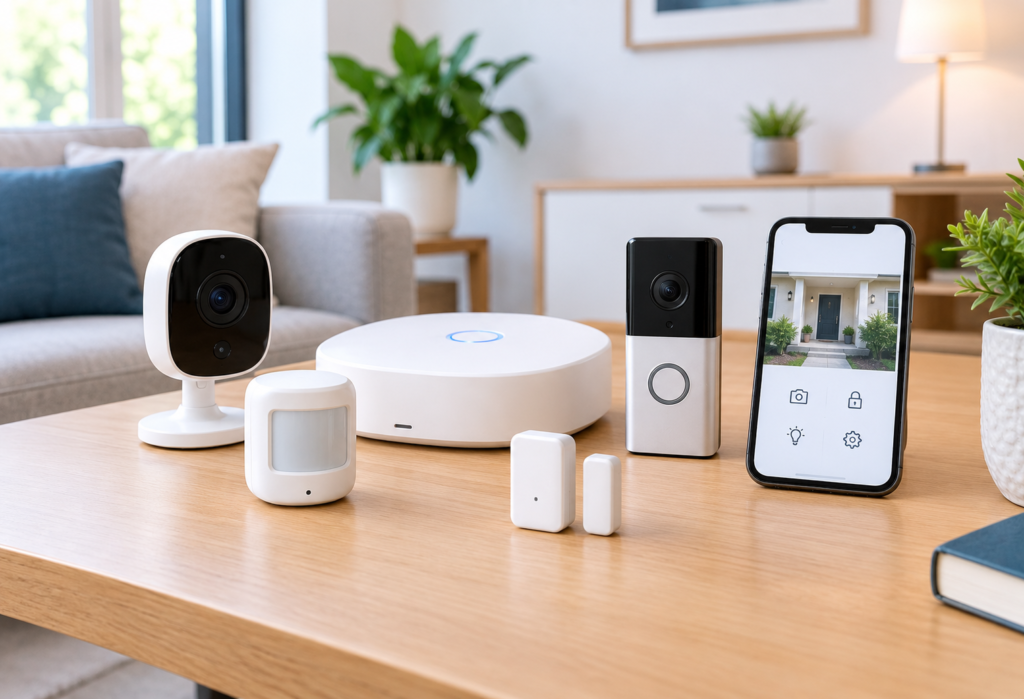
Budget Smart Home security system is among the major reasons why people decide to purchase a smart home product. Nevertheless, professionally installed systems might be rather costly not only due to their initial installation price but also because of their monthly rates.
It is fortunate that constructing a budget-friendly home security system does not imply high expenses nowadays. There are some cheap smart security cameras, doors and windows detectors, smart plug and other tools, which will enable you to arrange your budget-friendly smart security system spending approximately $200.
Smart security devices have also become simpler to use and install recently. Thus, people who are inexperienced in building security systems can arrange their home security without any difficulties.
Table of Contents
Why Choose a Smart Home Security System?
Remote Monitoring
With remote monitoring, one can observe his or her home from any place through a smartphone application. Compatible security cameras can offer live video, motion alerts, and recordings that will enable you to monitor your entry points and receive information on any unusual activities taking place around the house.
While you are either working or traveling, remote monitoring will give you the opportunity to see what is happening in your property without going there.
Instant Alerts
The intelligent security system offers notifications to a user’s smartphone when there is any detected activity. According to some types of cameras, the device may be able to recognize people, vehicles, packages, or even animals.
Notifications give one the ability to act immediately, for instance, observe your live video feed from cameras.
Easy Installation
Smart security systems tend to feature user-friendly DIY installation that makes them ideal for even beginner users. While many wireless cameras feature sticky or standard mounting options, there are some that require more complicated installation such as drilling and wiring.
Furthermore, wireless cameras also give you freedom of selecting installation locations since they can be easily moved around to ensure proper coverage of key spots including doorways and driveways.
Affordable Protection
Maybe the best thing about them is gradual buildup of security system without having to spend too much money on it. For instance, you may start with a single camera that costs $40 and add new cameras as you see fit.
What Makes a Good Budget Smart Home Security System?
Essential Features
In the process of selecting budget security system gadgets, there are some features which become mandatory if the gadget is going to be of use:
Motion detection It becomes mandatory that your security system have reliable motion sensors. Otherwise, you would just end up purchasing an expensive web camera. Try and choose gadgets which will allow you to set sensitivity level as you require.
Mobile app access A good mobile application interface must be user-friendly. This is because with the help of this, you can view the camera feed, check your alerts and review recordings easily. Since this application will be the interface to your smart security system, its usability becomes very important.
Smart notifications is also very important. Good budget models allow setting up your preferences concerning alert scheduling, the detection of particular types of movements and receiving notifications. Some even allow different settings at different times of the day.
Night vision is also an important feature as the majority of robberies take place at night. Nowadays, even the cheapest cameras have a good infrared night vision so don’t buy any camera which can’t provide clear footage in the dark.
Voice assistant compatibility is one more important feature as asking your system to show footage from the front door camera or enable the security mode makes it much more intelligent and not just connected.
Nice-to-Have Features
These features make budget security systems more convenient but are not crucial:
Cloud storage ensures that your video recordings will be safe even if the camera is stolen. There are many providers who provide some free cloud storage space, with paid subscriptions for extended periods.
Local storage features, like microSD card slots, ensure that your video recordings can be saved without requiring a monthly subscription of cloud storage. Some security cameras come with both cloud and local storage options to give you extra back up options if one of them is unavailable.
Two-way audio feature enables you to talk through cameras with people at your doorstep or any would-be intruders. It works wonders to prevent the theft of packages.
Smart automation features enable your security system to interact with other smart home devices.
Step 1: Start With a Smart Security Camera
Why Cameras Are the Foundation
Cameras can be used as a practical first step towards creating a cost-efficient smart home security system as they offer live view, motion notifications, and video recordings which can assist in evaluating any questionable actions. Depending on the type, video recordings can help in documenting cases of package theft and other illegal entries.
It is important to consider the key places that should be covered by the cameras as well as the recording feature of the cameras. The best places for coverage include front door, driveway, garage, and other easily accessible places.
Best Locations
Front Door is one of the mandatory locations that have to be covered as visitors come here, packages are delivered, and unfortunately, many break-ins happen. The camera should be placed at the height where it cannot be easily turned off, however, it would be possible to recognize faces.
Living Room Place cameras in order to cover all the places that can be easily entered through sliding doors or big windows. There can be indoor cameras which will provide you with extra security when outdoor cameras cannot cover those places.
Backyard While backyard security is often neglected, back doors and basements are some of the most used points of entry by intruders who expect no one to be looking in. With a smart camera installed here, you would catch them completely unawares.
Budget Range: $25–$60
Smart cameras that once would have cost hundreds of dollars now come packed with a great number of useful features at bargain prices of less than $50. What matters is picking models with a good reputation from established manufacturers whose products won’t stop working in six months’ time.
Step 2: Add Smart Door and Window Sensors
How Sensors Work
Smart door/window sensors are rather simplistic in their functionality but really efficient in practice. Consisting of two parts (one placed on the door or window frame, the other on its movable counterpart), these sensors send you a notification as soon as the gap between the two occurs (the door/window has been opened).
The greatest advantage of these sensors lies in their reliability. While camera systems can have some connectivity issues, door sensors work seamlessly and use very little power.
Benefits
Instant smartphone alerts since the system instantly sends an alert to your mobile phone, you are always informed of any opened door or window being monitored. This is more helpful when you are not at home, and there shouldn’t be anyone inside.
Additional protection when away More protection when you’re out provides reassurance when you go on holiday or spend long working days. Even if an intruder doesn’t pass through your cameras, he won’t get past open doors.
An option to get alerts about opened doors or windows can be helpful for keeping track of any actions at home even when you are not there.
Best Locations
Front door Door sensor is the most obvious and necessary option because this sensor covers the main entrance to your house and warns you about the intruders regardless of whether they rang the doorbell.
Back door must be covered too because it is often used by burglars who think that the back door is not as well-monitored as the front one.
Ground-floor windows of your bedroom or living room will give you additional levels of protection. You do not need to put sensors on all the windows – just choose those big enough for climbing into and easily accessible from outside.
Budget Range: $15–$40
Basic sensors for doors and windows are extremely cheap and in many cases, you may buy multiple packs and make the price per sensor lower. The main minus of cheap sensors is battery life and wireless range but in most cases, it will not be a problem.
Step 3: Install a Video Doorbell
Why It Matters
With video doorbells being installed today, monitoring home entrances has never been easier. Video doorbells allow you to monitor people visiting you from afar, be able to talk to delivery drivers and make specific arrangements, or inform solicitors that you are not interested. The most important thing about video doorbells is that they allow you to have recordings of what happens outside your door.
Video doorbells are an easy way to watch who is coming close to your house. Features like motion detection, live video, and recorded clips will be useful in watching over your visitors, deliveries, and the general activity going on near your front door.
Budget Benefits
There is increased competition in the video doorbells market, which is good for those who prefer to stick to their budgets. Today, inexpensive models of video doorbells come with features once exclusive only to expensive ones – like motion detection zones, two-way audio, and cloud recording.
No need to pay more than $200 for a reputable brand to get a working product. Affordable models priced around $50-$80 can offer you 90% of all features.
Step 4: Use Smart Lighting for Security
Security Through Automation
At first, it may sound like smart lighting is an unnecessary luxury but it is one of the best security precautions you could have. It all comes down to automation that makes sure that your house is occupied whenever you are away.
Lighting that activates in the presence of motion not only scares off burglars but notifies your neighbors of suspicious activities. It will also allow your surveillance cameras to see better.
Scheduled lights when you are not at home are even more crucial. Burglars are known to spy on houses before robbing them and if the lights do not switch on even once during your vacations, it means that you are not home.
Benefits
Smart lighting makes houses seem occupied via realistic patterns. Smart lighting systems that are the best can randomize scheduling so that lights do not switch on and off daily at specific times.
This is meant to keep off burglars because they would want homes where no one is living so that they can work undisturbed. A house that appears to have light and activity going on gives the impression that people are living there.
Smart lighting helps a house to be seen as occupied even when there are no people in the house. Scheduling lights to be on during sunset and switched off at night time produces more natural lighting patterns than having a single light lit all the time.
Step 5: Add Smart Plugs for Extra Automation
Budget Security Trick
Simply connect current lamps to smart plugs for an economical method of automation of home lighting system. These plugs will allow scheduling compatible lamps to switch on and off when you’re not at home to give the impression of an occupied house without changing any light bulbs or lamps.
Lamps on table and floor will do a great job. Don’t forget to make sure about the power rating of smart plug and compatibility of your devices.
Example Automation
Setting up lights for switching on at sunset will provide a pattern that resembles someone being home. The majority of smart plugs can automatically update the time of the sunset according to seasons.
Making randomization of schedule while traveling makes a huge difference. It will save you from having those lights which always switch on at precisely 7:00 PM. They may switch on at any moment between 6:45 PM and 7:15 PM.
Benefits
First of all, there is no need to purchase extra smart lights. You can make use of those lamps you like and do not want to replace them with some other ones.
Another thing is that it is easier to change the location of lamps. Smart plugs do not require hard wiring; you just plug it into any outlet.
Step 6: Integrate a Smart Speaker
Why Voice Assistants Help
When you integrate the smart speaker into your security system, then it acts as the control center of your system. It eliminates the need to open several apps to manage the camera, the sensors, and the lighting through one device.
The ease that comes with voice assistants is a huge benefit, yet another benefit is security. In case of any emergency situation, it takes less time to give a voice command than to take out your smartphone and open several apps.
Examples
Arm routines may control several security devices at once. You could say “goodnight” and have all lights turned off, sensors armed and cameras start recording.
Turn on lights Use the voice command to light up all the rooms in your house in case of any suspicious activity heard from outside.
Get notifications as soon as the sensors trigger the alarm or cameras detect any movements.
Manage cameras and sensors without the need to look for your smartphone or to remember what app controls what.
Voice control will provide you with more convenience in controlling your smart home security system when your hands are busy or when you are preparing for bed.
This guide compares the best Alexa and Google Assistant speakers for smart home control.
Step 7: Create Home Security Automations
Automation Example #1: Away Mode
As you are going out of your house, you need automation that will give you maximum security:
- Turn off lights for energy saving and to allow automation later
- Turn on cameras for video surveillance
- Notify yourself about everything that happens at home through notifications
In this way, you will never forget to turn on your security system. Previously, I always had to turn on the devices manually, but I forgot something or I was running out of time.
Automation Example #2: Night Mode
In the night mode, you do not need maximum security, but you still need security:
- Turn off certain lights but keep security lights on
- Turn on notifications when someone is moving around inside
- Lock your house using smart locks for maximum security
The main point in night mode is to regulate motion detection sensitivity and notification schedule to be sure that your home will not be burglarized, but you will not be awakened by your family members or pets.
Automation Example #3: Vacation Mode
Long absence calls for more complex automation:
- Lighting that follows random schedule
- Motion alerts with increased sensitivity because nobody should be there
- Video recording for further review of incidents
This is the mode where smart security system outshines the usual one because of its advanced automation.
Budget Smart Home Security Setup Examples
Basic Setup ($50–$100)
This entry-level system setup features one smart camera and one smart plug. The setup is designed specifically for apartments and dorm rooms where you require basic protection.
The smart camera serves as visual surveillance equipment of your central room or main entrance, whereas the smart plug controls one lamp. While the basic setup will not guarantee you full protection, it will be a thousand times better than having no security system.
Intermediate Setup ($100–$200)
The intermediate setup will feature a smart camera, door sensors, smart lights, and a smart plug. This combination will be best for a small house or renter who needs protection without any serious alterations to his property.
The intermediate system covers the most used entry points (doors), uses the visual confirmation option (smart camera) and generates the realistic occupancy patterns (smart lights). It is worth mentioning that most robberies involve opening doors.
Advanced Budget Setup ($200–$300)
This advanced package consists of several cameras, video doorbell, sensors, smart lighting and smart speaker. The combination of such equipment allows having full home coverage and it will suit large houses or houses located in risky zones.
Several cameras will eliminate the blind spots, video doorbell – protect from the front entrance, sensors – control other entry points and smart speaker – manage everything with the help of voice control.
Smart Home Security for Renters
Advantages
The tenants have some unique security needs which can be fulfilled by making use of smart gadgets without having to make any permanent changes. No-drill installations help in avoiding any wall damage and save you from losing your security deposit due to your landlord’s conditions. Easy setup and portability make it convenient for you to install and carry the gadget whenever required.
It is recommended to purchase wireless cameras, adhesively-mounted door sensors, windows sensors and smart plugs that will help tenants to install the gadgets for securing their house without making permanent installations. Please make sure that you fulfill all your requirements of the lease agreement and the device can be easily uninstalled without any damage.
Recommended Devices
Battery-operated cameras attach to the surface using an adhesive or magnetic base. Adhesive door sensors do not require screws or drilling to install. Smart plugs can operate in any outlet without making any trace upon uninstallation.
Make sure that the gadgets can be uninstalled completely without leaving any signs of their presence.
Common Budget Home Security Mistakes
Buying Devices From Different Ecosystems
Another frequent error when creating a smart home security system is purchasing equipment that does not work together well. The problem lies in the fact that one can buy a security camera that supports Google Assistant, door sensors that need their dedicated application, and smart plugs that function only with Alexa.
Select a dominant smart home ecosystem, whether it be Google Home, Amazon Alexa, or Apple Home, and purchase those devices that are compatible. Preferably choose products that work on your chosen ecosystem as well as Matter standards, where possible, for better management of connected devices.
Ignoring Wi-Fi Coverage
A low-quality Wi-Fi connection may cause security devices to malfunction. It will lead to a camera that will disconnect from the internet, delayed motion detection, and inability to load live footage when the network connection is low.
Test Wi-Fi coverage in all areas in which you intend to place security devices, including garages, backyard, entrances, and others. In case of poor coverage, try to change the position of your router, get a compatible Wi-Fi extender, or switch to a mesh Wi-Fi system.
Skipping Motion Notifications
Notifications are the major advantage of smart security devices, however, people tend to turn notifications off because they find them annoying. Instead of disabling alerts altogether, spend some time setting up sensitivity level and schedule.
Well-configured notification system will make you aware of any security incidents happening right away, while avoiding false alarms constantly disturbing you.
Forgetting Firmware Updates
Regular updates increase the stability and security of the system, however, not all budgetary devices update automatically. Make sure to set reminders in your calendar to check firmware updates once per month.
Smart Home Security vs Traditional Home Security Systems
| Feature | Smart Security | Traditional Security |
|---|---|---|
| Installation | DIY | Professional |
| Monthly Fees | Often optional | Usually required |
| Remote Access | Yes | Varies |
| Cost | Lower | Higher |
| Expandability | Excellent | Limited |
The comparison clearly favors smart security for budget-conscious buyers. Traditional systems require professional installation ($100-$300), monthly monitoring fees ($20-$60), and often long-term contracts. Smart systems give you similar functionality with more flexibility and lower costs.
Frequently Asked Questions
Can a budget security system really protect a home?
Yes, of course. The usage of cameras, sensors, and automation is highly effective in terms of deterring criminals, recording evidence, and notifying the homeowner of potential dangers instantly. In any case, it depends on selecting the reliable gadgets and installing them correctly.
The budget solution does not necessarily mean ineffective. It means using only those features that are important to make a home more secure without unnecessary gadgets and excessive spending.
Do smart security devices require subscriptions?
Many devices have some of their features available without subscriptions, while others are subscription-based. For instance, all cameras offer at least live view and basic alerts absolutely for free, but cloud recordings and artificial intelligence features may require an additional fee.
Before purchasing any device, it is necessary to read the description and figure out whether there are any subscription-based services needed
Can renters use smart security systems?
Of course. Numerous gadgets are built for renters and have features like removable adhesive mounting, battery operation, and wireless capabilities. It’s possible to establish thorough coverage without making any changes to the building or breaking any rules.
All you need to do is take pictures of the initial condition and retain all mounting materials during the process of moving out.
What’s the most important device to buy first?
A smart security camera is often the way to go first, since it offers visual surveillance, motion detection, and record-keeping functionality. In addition, cameras give you insight into traffic in your area and thus will help you place other gadgets accordingly.
One camera for your most vulnerable point of access will be sufficient to start.
🔗Related Articles
- Smart Home Security Systems in 2026 (Expert Buyer’s Guide)
- How to Build a Smart Home Security System (Ultimate Guide 2026)
- Schlage Smart Lock Review (2026): Is It Worth Buying?
- Best Smart Security Cameras for Home in 2026 (Complete Buyer’s Guide)
- How to Place Security Cameras for Maximum Protection (2026 Guide)
- Best Smart Video Doorbells for Home Security in 2026 (Complete Buyer’s Guide)
- Best Smart Door Sensors for Apartments in the USA (2026 Guide)
- Best Smart Sensors for Home Security (2026 Guide)
Final Verdict
Setting up an affordable budget smart security system in 2026 has never been easier nor less expensive. Starting with one security camera, followed by adding some sensors and automation for lighting, and even including a smart speaker system will allow one to build an effective security system that won’t require huge expenses.
It all starts with a low-cost solution and gradual upgrades. You do not need to make sure every single possible way to get into the house will be blocked from day one; just think about the most dangerous entry points at first and increase security gradually.
With patience and some good shopping, the amount of money you can spend on a security system can be as low as $200, and give protection comparable with thousands of dollars solutions.