
The world of home security has witnessed significant changes in recent times. No longer are people just going to lock up their house by putting their hope on a metal key and praying that it keeps the trespassers out. Modern house owners have a new set of priorities.
The Best smart locks are the ideal choice when it comes to the security of homes nowadays. They provide users with the most convenient and controlled option that conventional locks cannot provide at all. Think about not having to search your pockets in darkness for your keys or letting someone into your house even if you are miles away from home.
The advantages don’t stop at mere convenience. Smart locks allow you to get immediate alerts whenever anyone gains or exits your property, comprehensive logs of all the access points, and the provision of temporary access without giving away your actual keys to visitors. In many cases, homeowners have told me that they were first introduced to the concept of a smart home through their smart locks.
This article will provide you with all the information you need to know about the best smart locks for your house in 2026. Starting from simple keypads to advanced biometric locks, you can find the perfect fit according to your requirements and budget.
👉 “Looking for the best smart locks for home security in 2026? This guide compares top-rated locks, features, and expert recommendations…”
Table of Contents
Why You Need a Smart Lock
The Convenience alone justifies smart locks. You don’t know how often I have tried to search for my key while holding the grocery bags, and I end up dropping one thing or the other. With a smart lock, all you need to do is tap your phone or enter a PIN, and you’re in!
Access from afar alters how you will manage everything about your home. If your kids who are teenagers arrive from school, then you will receive immediate notifications. In case the housekeeper needs access to the house when you are away, you can allow him access from afar and deny access once he is through.
Temporary entry for guests might be where the smart lock really comes into its own. Rather than keeping hidden copies of the key, such as under the welcome mat (where everyone knows to look), or dashing off to let in the plumber, you could set up temporary access passwords. Give the delivery person an access password from 2 PM to 4 PM, and it’ll expire after that.
The Integration with smart home devices makes this product all the more versatile. Imagine this: as you enter your home, the smart lock detects your phone, unlocks the door for you, and simultaneously switches on the lights and sets the temperature as per your liking. It’s almost as if you have a personal assistant at your disposal.
For multi-schedule households, smart locks solve the issue of key distribution once and for all. Everyone can access the lock using their preferred way, such as a smartphone application, fingerprint recognition, or a personal PIN number.
Types of Smart Locks
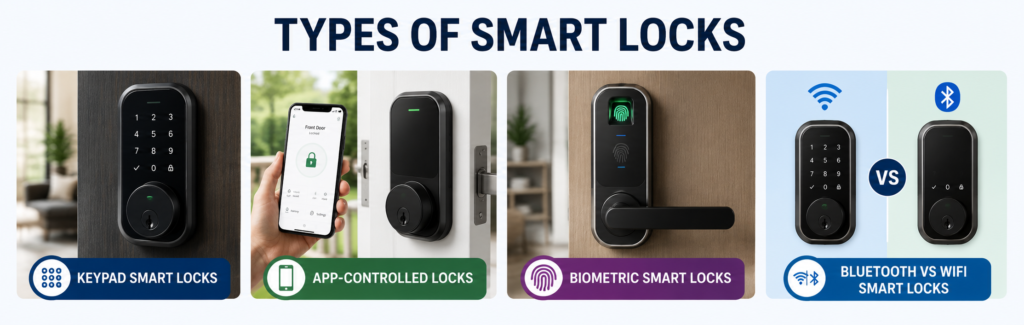
🔢Keypad Smart Locks
The easiest solution to use for smart locks is PIN access. These locks work via a number pad that lets you punch in a code, rather than using a traditional key. Keypad locks are elegant because there’s no need for a complicated app or any sort of Bluetooth connection at all.
Almost all keypads provide the opportunity to set several codes, which is ideal for families. One can allocate a unique code to each member of the household and even temporary codes to any guests or services personnel. Once they are no longer needed, one only has to remove their codes.
📱App-Controlled Locks
Phone-operated locks are the next level up in terms of smart locks. They are connected either by Bluetooth or WiFi to your phone and offer functionalities that are unattainable with just a keypad.
The main benefit here is the remote access. Be it your workplace, be it vacation, or simply your bedroom upstairs, you will always be able to lock and unlock your door whenever needed. What is more, most applications allow logging into the system to see exactly who unlocked/locked the door at what time.
An app-controlled lock usually comes with several ways of gaining access. It could be possible to use the app as the main access point while having alternatives such as using a key or entering codes on a keypad.
🧠Biometric Smart Locks
The use of biometrics in fingerprint recognition has been adopted from spy thriller films to our houses and is one of the most convenient forms of security measures available in the current era.
Biometric lock systems have the advantage of having fingerprints which can never be misplaced or stolen as compared to PIN numbers or keys. Most biometric lock systems usually have capability of storing several fingerprints.
Bluetooth vs WiFi Smart Locks
Your smart lock will be greatly affected by how connected it is. Bluetooth locks can only connect when you are nearby, which makes them suitable for basic smartphone operation. They generally have good battery life because Bluetooth consumes less energy than WiFi.
They provide real-time remote locking ability from anywhere around the globe; however, they need an internet connection, which consumes more battery life. WiFi is recommended for those who need remote locking services.
Selecting the right type of smart lock ultimately depends on how often you need connectivity and your lifestyle.
Key Features to Look For
🔐Security & Encryption
Security features should always come first in your smart lock selection process. Find a smart lock which employs AES 128 or 256-bit encryption since it is the kind of security that governments and financial institutions employ to keep their information safe. The encryption ensures that the connection between your lock and phone is safe.
Both pick-proof and bump-proof technologies are equally significant. There are numerous modern lock systems that are physically fortified against being picked by any known conventional method. Some even come equipped with an alarm that sounds if the lock is tampered with.
It helps create an additional level of security. It means that even if a person manages to steal your cell phone, you will require another means of access for your device.
📡Connectivity
Connectivity capabilities of the smart lock will affect your interaction with the device. If your smart lock is WiFi-enabled, then you will have maximum access to it as long as you are connected to the internet. On the other hand, WiFi locks are usually less battery-friendly compared to Bluetooth locks.
While Bluetooth is an effective technology for establishing connections and consuming very little energy, it does keep you limited in your range of movement. On the other hand, Z-Wave connects through the smart home hub and creates a mesh network.
Think about your personal requirements. Do you need to verify whether you locked the door while being at work, or are you interested in using it primarily when getting back home?
🔋Battery Life
Nobody wants their smart lock to fail them during an awkward time. A good smart lock lasts anywhere from 6 to 12 months before it needs another battery charge, but this depends on how it’s used.
Find locks that will notify you via your phone when their batteries are low. In addition, many locks have alternative sources of power, such as external battery connections and manual keys.
Some premium brands feature rechargeable batteries or even solar power capabilities, but expect to pay more for these additional features.
🏠Smart Home Compatibility
In case you plan to create a smart home ecosystem, compatibility is an important factor. All major smart locks will be compatible with Amazon Alexa, Google Assistant, and Apple Homekit but do your homework before making a purchase.
Thanks to that, you will be able to include your door lock in any automation scenarios. For instance, your lock will activate automatically when you ask Alexa “Good night”.
Many smart locks integrate with platforms like Google Nest for voice control and automation
📊Access Logs & Notifications
With activity tracking, you can have peace of mind as well as important data on who is entering and exiting your home. High-quality smart locks always log the activity by recording the time of lock/unlock and how it occurred.
Immediate alerts will notify you whenever something happens. You will know right away that your children have reached home from school, or your cleaning service has arrived, or even if anyone is trying to access your property.
Best Smart Locks for Home Security in 2026
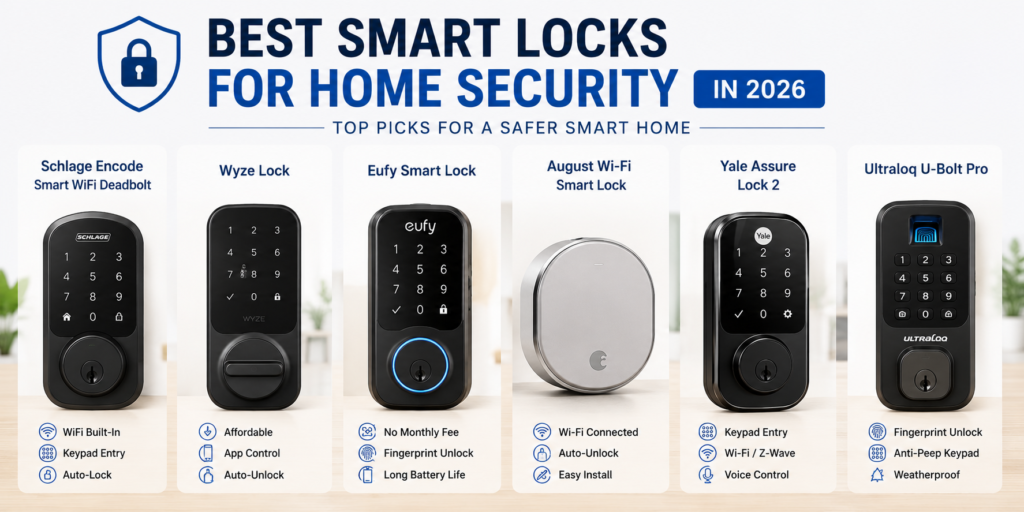
🥇Best Overall: Schlage Encode Smart WiFi Deadbolt
However, for the majority of people who install locks at home, Schlage Encode is always on the first position, and there are reasons why it deserves that.
Features:
- Inbuilt WiFi removes the need for extra hubs
- Stores up to 100 access codes
- Professional protection against anti-pick technology
- Works with Amazon Alexa and Google Assistant
- 3-year limited warranty
Pros:
- No monthly fees or subscriptions needed
- Simple installation procedure
- Superb construction and sturdiness
- Great customer service
- Excellent battery life (usually lasts for 10-12 months)
Cons:
- More expensive than standard models at the outset
- Lacks biometric lock entry features
- Fewer smart home compatibility choices than other brands
Best for: Those seeking a solid smart lock that requires little maintenance from homeowners.
🥈Best Budget: Wyze Lock
Wyze has created a name for itself by providing smart home solutions at amazingly low prices, and their smart lock is no exception. Though not having all the advanced features, it has excellent basic functions that are offered at a much cheaper price than those of its competitors.
Features:
- Bluetooth and WiFi support
- Unlocking automatically upon approaching with a phone
- Allowing guest access with a limited timeframe
- Logging activities and alerts
- Compatible with existing deadbolt hardware
Pros:
- Very low cost
- Can be installed on an existing deadbolt
- Works well for simple locking needs
- Has an easy-to-use smartphone application interface
Cons:
- Lacks advanced functionality
- Doesn’t have a backup keypad
- Works only in the Wyze system
Best for: Money-saving customers who desire simple smart lock capabilities but don’t want to spend much money.
🥉Best Without Subscription: Eufy Smart Lock
Unlike other smart locks, which encourage customers to subscribe to monthly payment options to utilize the advanced functions, the Eufy Smart Lock does not require such a subscription to use its complete functionalities.
Features:
- No subscription needed to use all the functionalities
- Bluetooth connectivity with the choice of WiFi bridging
- Access using keypad and app
- Rechargeable battery with a 12-month lifespan
- Local storage of information
Pros:
- Everything available without having to subscribe
- Heavy emphasis on privacy for users
- No need to change batteries due to rechargeability
- Solid build quality
Cons:
- Third-party integration with smart homes is restricted.
- Setting up the system may be complicated for some users.
- Response times from customer service vary.
Best for: Users who are concerned about privacy and do not want to pay monthly fees for the features.
🏆Best for Smart Home Integration: August Wi-Fi Smart Lock
August is the creator of the first smart lock and remains a pioneer in smart home integration technology. If you are creating an all-in-one smart home system, no other lock compares to the technology offered by August.
Features:
- Compatible with most deadbolts currently in use
- Wide range of platforms for smart home systems
- Automatic unlocking and locking
- Detailed Activity logs
- Options for professional monitoring services
Pros:
- Installed on top of current hardware
- Great smart home ecosystems compatibility
- Automates tasks efficiently
- Software is constantly being improved
Cons:
- Some functionalities may need subscriptions
- Short battery life compared to other models
- May be difficult to install for newbies
Best for: Technically skilled home owners creating comprehensive smart home systems with numerous interconnected gadgets.
⚡Best Premium Option: Yale Assure Lock 2
Yale has more than 180 years of experience in producing locks. The Assure Lock 2 is a top-of-the-line product that offers high-end features and robust build quality. This lock is designed for people who want the best available technology.
Features:
- Multiple ways to connect (WiFi, Z-Wave, Zigbee)
- High-quality material
- Advanced security features
- Professional installation available
- Comprehensive warranty program
Pros:
- Superb construction and longevity
- Variety of connectivity options for versatility
- Professional-level security functions
- Customization possibilities galore
Cons:
- Expensive initial investment
- Feature list can be daunting to beginners
- Certain features require tech-savviness
Best for: Those looking for superior quality products and services and are ready to invest in them.
🏢Best for Apartments: Ultraloq U-Bolt Pro
Smart locks also have unique considerations for apartment users such as lease restrictions and the requirement for simple installation and uninstallation. The Ultraloq U-Bolt Pro is ideal for these requirements as well as providing various unlocking methods within one lock.
Features:
- Various unlocking techniques: fingerprint, app, keypad
- Easy installation without permanent change
- Rechargeable battery with long-lasting capacity
- Weatherproof Design
- Guest access management
Pros:
- Does not require any changes made to door permanently
- Multiple backup ways to get access
- Great price considering the features offered
- Suitable for apartment owners
Cons:
- Lacks smart home compatibility
- Needs improvements in app user experience
- Unpredictable customer support
Best for: Apartment dwellers requiring easy installation and multiple entry points.
Quick Comparison Table
| Smart Lock | Connectivity | Unlock Methods | Power | Subscription | Best For |
|---|---|---|---|---|---|
| Schlage Encode Smart WiFi Deadbolt | WiFi | Keypad, App, Voice | Battery | Optional | 🏆 Best Overall |
| Wyze Lock | Bluetooth + WiFi (Gateway) | App, Auto-Unlock | Battery | No | 💰 Best Budget |
| Eufy Smart Lock | WiFi / Bluetooth | Fingerprint, Keypad, App | Battery | No | 🔐 No Subscription |
| August Wi-Fi Smart Lock | WiFi | App, Auto-Unlock, Voice | Battery | Optional | 🧠 Smart Home Integration |
| Yale Assure Lock 2 | WiFi / Z-Wave | Keypad, App | Battery | Optional | ⚡ Premium Pick |
| Ultraloq U-Bolt Pro | Bluetooth / WiFi | Fingerprint, Keypad, App, Key | Battery | No | 🏢 Apartments |
This comparison shows the main distinctions between the leading smart locks. Both the Schlage Encode and the Yale Assure Lock 2 feature the highest possible autonomy, whereas both the Eufy and Ultraloq models have a rechargeable battery that allows you to enjoy the services of a smart lock without additional expenses on batteries.
Both functionality and energy consumption will be affected by the types of connectivity employed. WiFi locks can work remotely but use more battery power. Locks that only use Bluetooth will ensure energy efficiency and good reliability locally.
Quick Insight
- 🏆 Best Overall → Schlage Encode
- 💰 Best Budget → Wyze Lock
- 🔐 No Subscription → Eufy Smart Lock
- 🧠 Best Smart Home → August Wi-Fi
- ⚡ Premium Choice → Yale Assure Lock 2
Smart Lock vs Traditional Lock
| Feature | Smart Lock | Traditional Lock |
|---|---|---|
| Access Method | App, keypad, biometric, or physical key | Physical key only |
| Remote Control | Yes (control from anywhere via internet) | No remote access |
| Access Logs | Tracks entry history and activity | No activity tracking |
| Guest Access | Temporary codes and scheduled access | Requires sharing physical keys |
| Security Alerts | Real-time notifications and alerts | No automatic alerts |
| Cost | $100–$400+ (may include subscriptions) | $20–$100 (no ongoing cost) |
| Installation | Moderate (may require professional help) | Easy DIY installation |
| Maintenance | Battery replacement, software updates | Minimal (occasional maintenance) |
From this comparison, it is evident that the use of smart locks provides increased flexibility, although at a relatively higher cost compared to that associated with using traditional locks. Traditional locks are dependable and uncomplicated, and thus suitable for those who want a simple locking system.
Smart locks perform well when monitoring, remote management, and guest control are needed. Regular locks will be helpful when users prefer simplicity.
How to Choose the Right Smart Lock
Budget is the most important criterion when it comes to reducing choices. Simple smart locks with keypads are available for less than $100, while higher-end smart locks that come with several connectivity options and feature sets may be priced at $300 and above. Do not forget to consider the possibility of monthly subscriptions if you wish to avail of certain features.
Compatibility between your current door lock and new smart lock system is very important but commonly forgotten. Before you start shopping, make sure to measure your door’s thickness, backset measurement, and any existing hardware. Most smart locks can be used with standard residential doors, but not all.
Assess your connectivity requirements realistically. In case you only care about the convenience of opening the door as soon as you return home and don’t need any remote notifications, a lock that works with Bluetooth only would be cheaper and wouldn’t consume more power than necessary.
Your security features must suit your risk level and peace of mind requirements. However, all smart locks will offer superior security to conventional locks, but there are some that may have more security features such as monitoring alerts and auto-locking.
Think about whom will use the lock often. Parents with teenage children would rather use a keypad lock than other types. Adults who are used to using technology can use their phones to open the locks. Elderly relatives who come to stay for a while should also be considered.
Installation & Setup Guide
Smart lock devices are normally made in such a way that they can be installed by anyone with the right knowledge, and it only takes 30-60 minutes to do so. Some of the tools required include screwdrivers and drills.
The basic procedure for installation entails taking out the old deadbolt, putting in the new smart lock, and then linking the outdoor and indoor parts. The manufacturer usually provides instructions, and sometimes they provide video instructions on how to do this.
App installation takes place after the hardware installation is completed. The manufacturer’s app should be downloaded, an account made, and the process of connecting the phone and the lock followed. The latter includes pressing some buttons on the smart lock while the app finds it.
Test the access methods once the system is installed. Access through your phone’s application, keypad access (if available), and other functionalities such as automatic locking or guest access should be checked. Ensure that you can still gain access using the physical key if the model has this feature.
Professional installation is an option to consider if you lack experience in doing such installations yourself or if there is a need for any customization work on your door. Most of the companies selling smart locks provide professional installation services.
Common Mistakes to Avoid
Poor passwords/PINs undo any good that can be gained from using smart locks. Never use obvious passwords such as “1234” or your house number. Also, you should use separate PINs for different people and change passwords regularly, especially if you have just had someone over to your home.
If you neglect software updates, your device will be prone to security problems and will miss out on additional functionalities. Consider setting up automatic updates whenever possible or at least checking once a month for firmware updates.
Inaccurate compatibility assumptions could result in costly errors. Ensure that the lock you have selected is compatible with your door thickness, other hardware, and smart home system. When unsure, reach out to the manufacturer’s customer service.
Problems with WiFi can really impact the efficiency of your smart lock. If your router is too far from your main entrance, you should look into buying a WiFi extender or even using mesh networking.
Failure to remember backup access methods will deny you access in the event of battery failure. Remember to have a backup access method for your device, such as a key, secondary PIN code, or mobile access.
❓FAQs
Are smart locks safe?
Smart locks tend to be more secure than conventional locks because of their advanced encryption methods, anti-pick options, and monitoring capabilities. Nevertheless, there is always the risk of cyber security breaches, which is not the case for mechanical locks. Select smart locks from reliable vendors using advanced encryption.
Do smart locks work without WiFi?
Most smart locks feature various connectivity methods. The functionalities that utilize Bluetooth technology do not need WiFi connection but can function even through smartphones. Nevertheless, some features need internet connection to operate effectively. Some smart locks keep the codes stored offline, thus the code entry will continue even if the internet is down.
Can smart locks be hacked?
Just like any other device that can be connected to the internet, there is the possibility of hacking attempts for smart locks. But the best brands in the market incorporate banking-standard encryption measures and other security protocols to prevent any hacking attempts from succeeding.
What happens if the battery dies?
Most of the smart locks available offer many backup solutions in case of a battery drain. Most offer warnings about the draining battery being sent through your mobile phone days before its full depletion. The solutions offered include manual key unlocking, an emergency power supply through battery terminals, and capacitive touch mechanisms that run off a 9V battery.
Smart lock batteries typically last 8-12 months with normal use, giving you plenty of warning before replacement is needed.
🔗Related Articles
- Smart Home Security Systems in 2026 (Expert Buyer’s Guide)
- How to Build a Smart Home Security System (Ultimate Guide 2026)
- Schlage Smart Lock Review (2026): Is It Worth Buying?
- Best Smart Security Cameras for Home in 2026 (Complete Buyer’s Guide)
- How to Place Security Cameras for Maximum Protection (2026 Guide)
- Best Smart Video Doorbells for Home Security in 2026 (Complete Buyer’s Guide)
- Yale Smart Lock Review (2026): Is Yale Assure Lock 2 Worth Buying?
- Common Smart Home Security Mistakes to Avoid (2026 Guide)
- Best Smart Home Security Systems WITHOUT Subscription (2026)
- Best Smart Door Sensors for Apartments in the USA (2026 Guide)
🚀Conclusion
Smart lock solutions in 2026 are diverse enough to suit all homeowners. The Schlage Encode is highly recommended because it is reliable and packed with features without any need for subscriptions. For those on a budget, the Wyze Lock can be relied upon due to its affordability and basic features.
In case of requirements for privacy, the Eufy Smart Lock stands out in avoiding any form of subscription services. For individuals looking for a smart lock that integrates seamlessly with other smart devices, the August Wi-Fi Smart Lock is the best bet. For those looking for a high-end product, the Yale Assure Lock 2 is ideal.
Apartments owners will enjoy the multiple ways of accessing and installing the Ultraloq U-Bolt Pro.
The main point in selecting the proper smart lock is determining your requirements, financial capabilities, and skills. Regardless of whether you need a simple keyless lock or an entire system of smart home security solutions, there is a perfect smart lock for any case.
Wish to make your property more secure with smart locks? Take a look at these top smart locks deals and reviews now..