
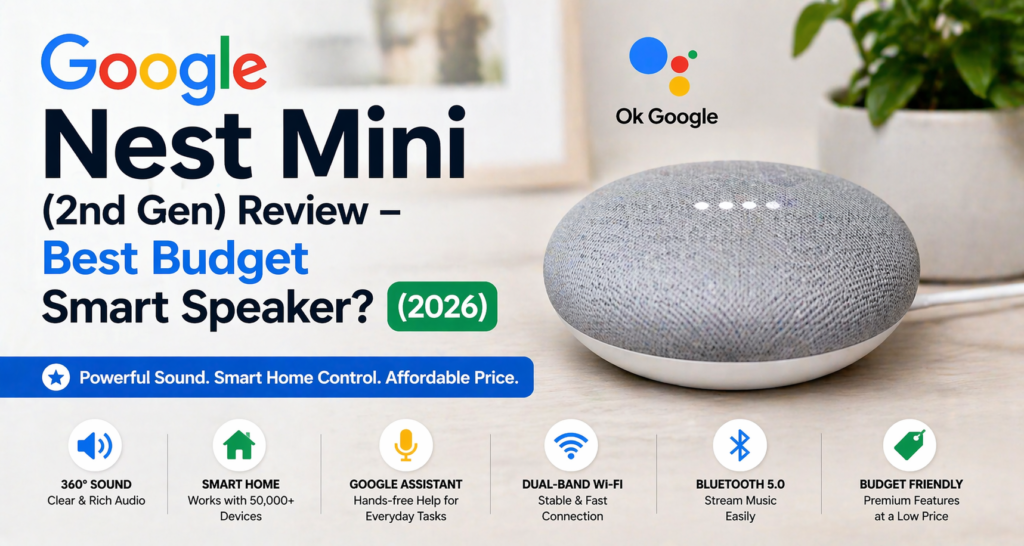
Google Nest Mini (2nd Gen) Review (2026) – When it comes to purchasing a smart speaker that gives you dependable voice control along with decent performance in general, Google Nest Mini is surely one of the best choices you could go with in this budget segment.
Although it’s small in size and costs little money, you get Google Assistant, smart home controls, music streaming capabilities, voice commands, and integration with Android products and Google services. This makes it great for apartments, bedrooms, kitchens or any other place where you start building your smart home.
This review will tell you everything about Google Nest Mini’s capabilities, sound, setup process, pros and cons, and overall performance.
Table of Contents
Key Specifications
| Feature | Details |
|---|---|
| Price (USA) | $49 MSRP (often on sale for $25–$30) ✅ |
| Connectivity | Wi-Fi (2.4GHz & 5GHz), Bluetooth 5.0 ✅ |
| Voice Assistant | Google Assistant ✅ |
| Speaker Size | 40mm driver ✅ |
| Audio Output | 360° sound with improved bass ✅ |
| Smart Home Compatibility | Works with 50,000+ smart devices ✅ |
| Dimensions | 3.85 in (diameter) x 1.65 in (height) ⚠️ (not 4.21) |
| Weight | 6.35 oz (≈181g) ⚠️ (slightly higher than 6.1 oz) |
| Power | 15W AC adapter (no battery) ✅ |
👉 “The Google Nest Mini (2nd Gen) offers premium smart features at a budget price, making it one of the best entry-level smart speakers in the USA.”
Design & Build Quality
The Google Nest Mini (2nd Generation) has a compact, fabric-based body design that gives it a modern look and allows it to blend with the surroundings. Being compact in size, it serves well for bedroom, kitchen, desk, or apartment use without taking up too much space.
In-built wall mount slot ensures convenient mounting, thus helping you save some counter space. The four LED lights become visible only after activating.
The device comes in Chalk, Charcoal, Coral, and Sky colors, thus fitting perfectly in most household interior designs. It has better build quality than the previous generation Google Home Mini, as well as sturdier and smoother base design.
However, the one disadvantage of the product is that it cannot be powered independently but needs to stay connected all the time to electricity source. But, given its low price, the design and build quality of the product are great.
Sound Quality – Is It Good Enough?
As far as its sound performance for the money and size, the Google Nest Mini (2nd Gen) is surprisingly solid. Though it will hardly be able to compete with a specific Bluetooth speaker in terms of sound quality, it provides clear vocals, balanced mid-range, and better bass than its predecessor.
Google guarantees that this speaker provides 40% more powerful bass, and the difference is really audible. The music sounds richer, the podcasts are crispy, and voice replies stay clear even at maximum volume. It is a great option for bedrooms, kitchens, offices, and apartments.
Music Performance
Google Nest Mini (2nd Gen) is a good device for playing music. It has clear vocals, balanced mid frequencies, and loud enough sounds to fill up a bedroom or kitchen or any other room of an apartment, making it a perfect device to listen to Spotify, YouTube Music, or any other service while you are cooking, working, or simply relaxing.
Though the device is great at playing pop, acoustic, podcasts, and any other music with vocalists, its small size makes it unsuitable to play genres such as electronic, EDM, or hip-hop because there will not be enough bass in them.
Voice Clarity
One of the standout qualities of the Google Nest Mini (2nd Gen) is its impressive voice clarity. Whether you’re listening to podcasts, audiobooks, the news, or Google Assistant’s responses, the sound is crisp and very clear.
Since it is intended to be used as a voice assistant, speech sounds natural and clear at any volume, making it perfect for use in daily activities, hands-free calls, and listening to spoken content.
Room Size Suitability
The Google Nest Mini (2nd Gen) smart speaker suits bedrooms, kitchens, home offices, bathrooms, and small living rooms. It provides balanced sound quality within a room size of 200 square feet, making it ideal for apartments and smaller homes.
Thanks to its 360-degree sound design, it offers consistent sound regardless of where you are in the room. In case of large rooms and people who like loud and powerful sound, a larger smart speaker would suit your needs better.
Features & Smart Capabilities
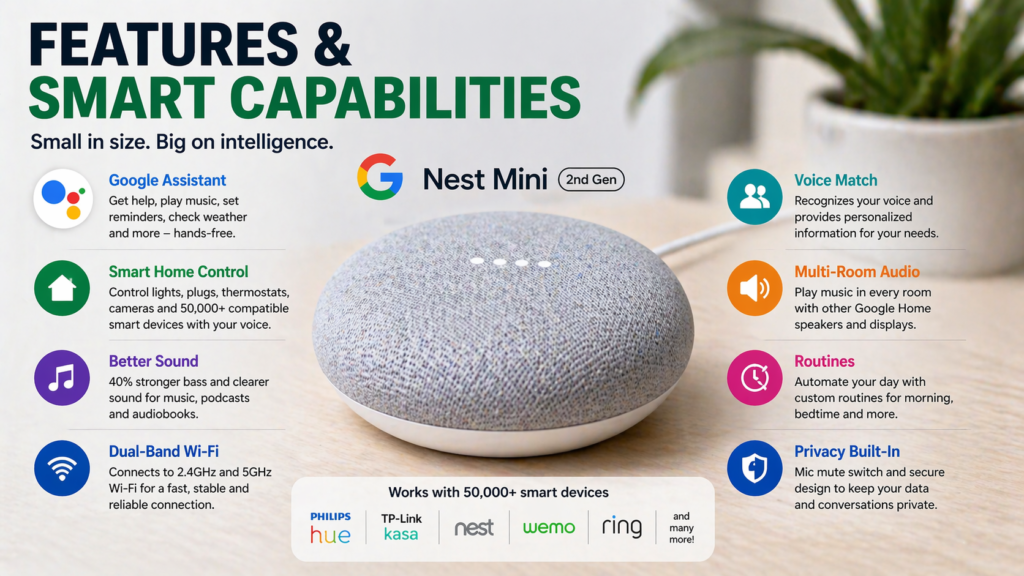
One of the key benefits of the Google Nest Mini (2nd Gen) is its smart capabilities and a fast reacting Google Assistant. It can give an answer, set a timer or reminders, check the weather forecast, play music and control smart home devices with a simple command.
This speaker is compatible with leading smart home products, which means you can control smart lights, thermostats, plugs, cameras and other gadgets using the Google Home app. Furthermore, the device features multi-room audio that allows playing synchronized music in several Google speakers.
Another advantage of the device is Google Routines, which enable performing multiple actions with one command. For instance, the “Good Morning” routine allows turning on lights, providing weather forecast and activating compatible smart devices, while the “Good Night” routine turns off lights and adjusts the thermostat.
Voice Match identifies different users and gives personalized calendars, reminders and answers to each of them. The main limitation of smart features of the device is the necessity of stable connection with Wi-Fi.
Setup Process
Setting up Google Nest Mini (Gen 2) is easy and takes no more than 10 minutes of your time. All you need is to plug it in, launch Google Home app, and follow the on-screen prompts while connecting it to your Wi-Fi network. Even those who have never used smart home devices will be able to finish the process easily.
Here’s exactly what you do:
- Plug in the device – It’s impossible to remove the power cable, so all you need is to plug it anywhere
- Download the Google Home app – It can be downloaded for free from the App Store and Google Play
- Open the app and tap “Add device” – The app will automatically find your device
- Connect to your Wi-Fi – Type in your Network password
- Sign into your Google account -The same one you use for Gmail and YouTube
- Choose your settings -Choose location, music streaming service, and other parameters
Setting up the Google Nest Mini is quite easy and takes about 5 to 10 minutes. With the help of the Google Home app, the setup procedure becomes very easy even for a beginner.
It is necessary to connect your phone to the same Wi-Fi as the one where you wish to install the speaker for easy and flawless setup. Any difficulties that you face in the process can be solved by following the official guide from Google Home.
Performance & Daily Usage
The Google Nest Mini (2nd Gen), after everyday use, shows good performance in executing voice commands and managing the smart home, among other daily activities.
The microphones in the far-field mode accurately pick up the voice commands made from any corner of the room, even when there is some ambient noise around. The Google Assistant responds almost instantly.
For daily use, the Nest Mini is especially useful for:
- Setting timers, alarms, and reminders
- Checking weather conditions, news, traffic updates, and appointments on the calendar
- Playing music, podcasts, and white noise to fall asleep faster
- Operating smart light bulbs, power plugs, thermostats, and other IoT devices
- Responding to your voice questions and searches
Although voice recognition works perfectly, some misactivations can happen because of the TV sounds and conversations in the room that resemble the wake-up phrase. Overall, the Google Nest Mini smart speaker offers a reliable user experience.
Connectivity (Wi-Fi & Bluetooth)
Features include support for dual band Wi-Fi (both 2.4 GHz and 5 GHz) to ensure stability and reliability when using voice controls, playing music, and operating your smart home gadgets. Quick setup through the Google Home application, and reconnection to a new Wi-Fi network takes just a few minutes.
Bluetooth Connectivity
In addition, Google Nest Mini acts as a Bluetooth speaker and allows playing music, podcasts, audiobooks, and other audio files from your mobile device, such as a smartphone, tablet, or laptop.
How to connect:
- Say “Hey Google, pair Bluetooth” or enable pairing in Google Home app.
- Navigate to your device Bluetooth settings.
- Choose Nest Mini in the list of available devices.
Bluetooth connection ensures stability and reliability in a standard room or apartment, and provides the same high-quality sound as when connected to the Internet via Wi-Fi. The only downside of the Bluetooth connection is that when it’s being used, some voice control features from Google Assistant are not available.
Google Nest Mini vs Competitors
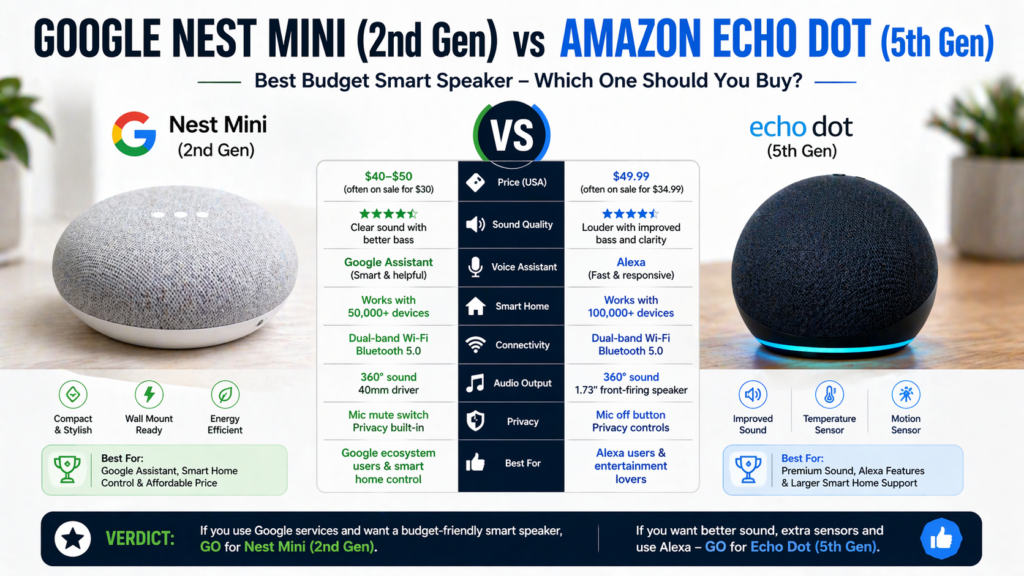
After comparing the Google Nest Mini with other popular budget smart speakers, here’s how it stacks up:
Google Nest Mini vs Amazon Echo Dot (5th Gen)
While the Amazon Echo Dot is $10 more expensive, its bass is slightly superior, and the maximum volume is a little louder than that of the Google Nest Mini. But Google Assistant outclasses Amazon Alexa in comprehending natural language and providing accurate answers.
When it comes to controlling smart devices, you can use either product depending on which devices you currently own. For someone who has nothing set up yet, they’ll work with all major brands.
Google wins on:
- Better voice recognition
- Better flow of conversation
- Better integration with Google ecosystem (Gmail, Calendar, YouTube)
Echo Dot wins on:
- Better sound quality
- More smart home device compatibility
- Better options for music streaming
Comparison with Older Google Home Mini
These are the differences which are not so significant but they make a difference:
- 40% improved bass sound quality
- Faster process time (less delay between your command and reply)
- Superior microphone array which can hear you from a greater distance
- More resistant fabric which is easier to clean
If you own the first generation model of the device, the update is not necessary because there is no significant difference between them.
Best Budget Smart Speaker Overall
Google Nest Mini (2nd Generation) This speaker is one of the best budget speakers under $60. This speaker delivers good performance of Google Assistant, sound quality, control of the smart home, and ease of use at an affordable price. Most people will find this speaker worth its price.
Common Problems & Fixes
Just like any other smart device, Google Nest Mini might have small issues sometimes. Below are some of them along with easy solutions.
Doesn’t Connect to Wi-Fi
This problem occurs because of having many characters in your password or special characters which Google cannot use.
Solution: Try connecting to your phone’s hotspot first to see if the device will connect and after that try troubleshooting your Wi-Fi network.
Doesn’t Respond to Voice Commands
There could be an issue with a microphone or the device needs to be refreshed.
Solution: Unplug the device for 30 seconds and plug it in again. In case it doesn’t help, check whether the microphone is unmuted (orange light on the top).
Google Home App Cannot Detect Device
This problem occurs while setting up the device because your phone and the speaker are not on the same network.
Solution: Make sure that your phone is connected to the same Wi-Fi network as the speaker.
🔧 Factory Reset Guide
When everything fails, there is always factory reset as the last resort.
How to factory reset:
- Switch off the microphone at the back
- Press the middle part of the device where the lights are for about 15 seconds
- There will be confirmation from Google that the device has been reset
- Switch back on the microphone
- Reconfigure using the Google Home application
Factory resetting google home mini takes away all settings, but it fixes most problems.
How to reset google nest mini is similar to the above process since Google uses both terms for this product.
If you have difficulties even after factory reset google home mini, contact Google support since your device may be faulty.
Pros and Cons
After three months of real-world testing, here’s what actually matters.
✅ Pros:
- Low price – Only $40-50
- Perfect integration with Google Assistant – Works well and fast
- Nice sound considering its size – Much better than it should be
- Easy to set up – Easy even for people who are not tech-savvy
- Compact design – Easily fits everywhere and looks good
- Strong smart home support -Good compatibility with all brands in smart homes
- Wall-mountable – Perfect for small apartments
- Multiple user support – Personalized responses
❌ Cons:
- No battery – Needs always to be connected
- Poor bass – Not enough for music enthusiasts
- No 3.5 mm jack – No easy connection to external devices
- Always needs to be connected to the Internet – Useless without Wi-
- Tends to activate by accident – May be triggered by TV or conversations
- Low volume – Not loud enough for big rooms
The advantages definitely outweigh the disadvantages in most cases, especially considering the price of the product. It all comes down to how important the limitations are to your particular application.
Pricing in USA (2026)
The normal price range for the Google Nest Mini device is usually $40-$50 retail; however, it often ends up on discount.
Best times to buy:
- Black Friday – Usually goes down to $25-30
- Amazon Prime Day – Usually 30-40% discount
- Back-to-school sales (August) – Discounts for students
- End of year clearance (December) – Retailers trying to clear stock
The Google Nest Mini (2nd Gen) usually retails for $30-$50, but when you get the device in major discounts during Black Friday, Prime Day, or the holidays, it could be purchased for $20-$25. This makes it very good value for money.
Where to find the best deals:
- Amazon offers the lowest prices
- Best Buy will match online prices and also offer color exclusivity
- Target will bundle it with some smart home gadgets
- The Google Store may have trade-in deals available
It is common to find the Google Nest Mini (2nd Gen) on sale during big shopping events, such as Black Friday, Prime Day, or holiday sales. Discount sites such as Slickdeals will be useful in searching for limited-time deals.
At its normal price of roughly $50, the Google Nest Mini provides good value for money. The speaker is great in terms of the Google Assistant service, smart home integration, and audio quality.
Best Use Cases
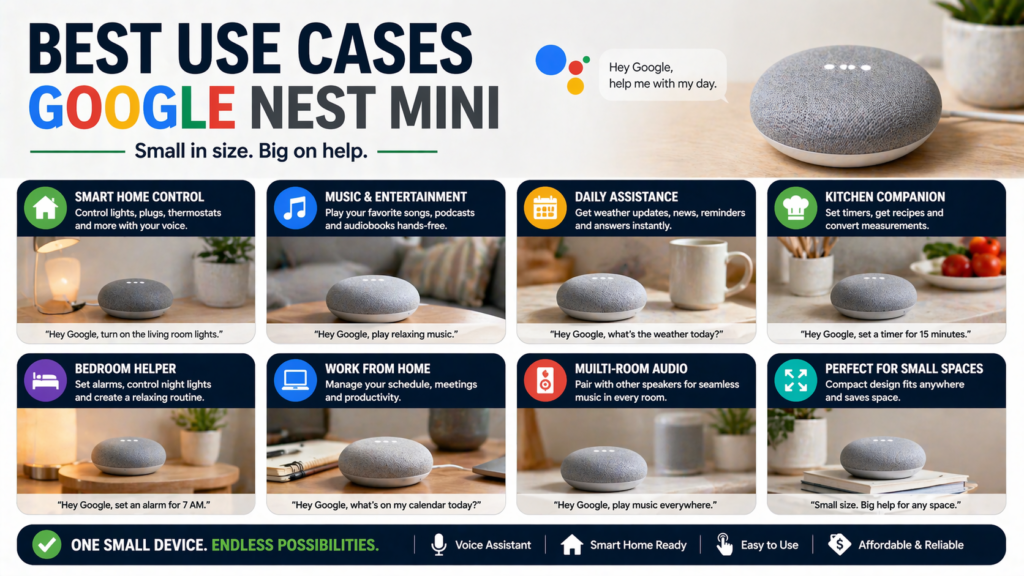
Best Use Cases for the Google Nest Mini
The Google Nest Mini (2nd Gen) can be a very useful smart speaker, but it works best in small places and during common activities.
Bathrooms: Excellent for weather checks, podcasts, and music as long as it is not placed too close to water sources.
Studio Apartments: Due to its small size and good sound quality, it is perfect for studio and one-bedroom apartments.
Bedrooms: It is perfect for alarms, sleep sounds, relaxing music, and voice assistants.
Kitchen: Good for timers, converting units of measurement, checking cooking recipes, and listening to music while cooking.
For People Getting Smart Homes: Affordable choice to begin using smart lights and plugs as well as other compatible smart devices with the Google Assistant.
Guest Rooms: Provides guests with quick access to music, weather checks, alarms, and voice assistance without occupying too much space.
Who Should Buy It?
Smart Speaker Newbies
If this is your first time getting into smart speakers, this is an ideal choice for you. It’s affordable enough that even if you end up not using it often, it’s not going to make you feel bad, while at the same time powerful enough to demonstrate what a good smart speaker can do.
People on a Budget
For those who want a smart speaker but are not willing to pay more than $100 for one.
Google Ecosystem Users
Gmail, Google Calendar, YouTube Music, Android phones – whatever other services from Google you’re using, this google home will fit right into them.
Apartment Dwellers
It’s small enough and not too loud to work well in smaller apartments where a bigger speaker will just be unnecessary.
Students
An ideal option for students living in dorms or other shared accommodations.
Who Should Avoid It?
Audiophiles
This is decent for sound quality, but if you’re an audiophile, you’ll definitely find it lacking. Save your money for some better speaker.
Users Who Require High Decibel Speakers
If you need loud speakers to make a party or fill large spaces with sound, this speaker isn’t built for those purposes. The Google Nest Audio is a much better choice in that case.
Apple HomeKit Users
Though this is compatible with several smart home products, it isn’t one of those. This won’t be compatible with Apple’s HomeKit and therefore isn’t a very good choice for people with a setup like that. You can expect some cheap HomePods soon though!
People with Inconsistent Wi-Fi or Data Caps
If you have inconsistent or poor Wi-Fi, then you shouldn’t consider this since it requires Wi-Fi connection for almost everything.
Privacy Worries
If you’re someone who doesn’t like the idea of a device always listening to you, this isn’t the best choice for you.
❓FAQs
How to set up google home mini?
Download Google Home application, connect your device to power, and then just follow the guidance offered in the app. It’ll take around 5 minutes to complete and will need Wi-Fi password and your Google account.
Is google nest mini discontinued?
No, Google Nest Mini (2nd generation) is still produced and updated by Google. It’s the company’s affordable smart speaker model since 2019.
How to reset google nest mini?
Turn off the microphone setting, press and hold center button for 15 seconds until you hear the confirmation sound, then turn microphone back on. How to setup google home mini procedure will involve the process of reconfiguration from scratch.
Can it work without Wi-Fi?
Limited capabilities without Internet access. Maybe the pairing via Bluetooth will be possible, but all other functions won’t work.
Is it better than Echo Dot?
Depends on personal preference. Google Assistant is overall better when it comes to answering queries and conversations, but the Echo Dot has a little bit better sound quality and smart home device compatibility. Either is an amazing budget choice.
Will it work as a regular Bluetooth speaker?
Yes, you can connect your phone using Bluetooth connection and listen to all your audio through the speaker. Simply say “Hey Google, pair Bluetooth” or use the Google Home app to enter the pairing mode.
Is it compatible with iPhone?
It is compatible with iPhones, but you need to download the Google Home app from App Store. It integrates better with Android devices.
How loud does it get?
Pretty loud for small and medium sized rooms. The maximum volume will do for background music or voice only content, but not for parties.
🔗Related Articles
- Google Home Setup Step-by-Step (2026 Guide for Google Nest, Mini & Smart Home Devices)
- Alexa vs Google Assistant: Smart Home Comparison
- Alexa Keeps Disconnecting? 12 Powerful Fixes That Work Instantly (2026 Guide)
- Best Smart Speakers under $100 (2026) – Top Budget Picks That Actually Sound Good
- Best Smart Speakers for Small Apartments (2026 USA Guide)
- Best Bluetooth Speakers 2026: Shocking Smart Home Picks Under Budget
🚀Final Verdict – Is It Worth It in 2026?
⭐ Overall Rating
Design: 9/10 – Compact, modern, and high-quality build
Audio Quality: 7.5/10 – Good sound quality with enhanced bass for its size
Smart Features: 9/10 – Responsive Google Assistant and great smart home controls
Value: 9.5/10 – Lots of value for the money
Overall: 8.5/10
The Google Nest Mini (2nd Gen) is still one of the best budget smart speakers of 2026. This device offers reliable Google Assistant, easy smart home integration, and pretty good sound from a small, affordable product.
✅ Buy It If:
You’re looking for an inexpensive first smart speaker.
You use Android or Google ecosystem.
You need a small speaker for a bedroom, kitchen, office, or studio apartment.
You want to have an easy way to control your smart home devices.
❌ Don’t Buy It If:
You want a really powerful sound with low-frequency bass.
You want to use it as a speaker for a big living room or party.
At just about $40-$50, and sometimes even cheaper during various promotions, the Google Nest Mini is a very good buy.
For official support and detailed specifications, visit the Google Nest official page. Download the Google Home App for setup and control. For technical issues, check the Google support page for troubleshooting guides.