
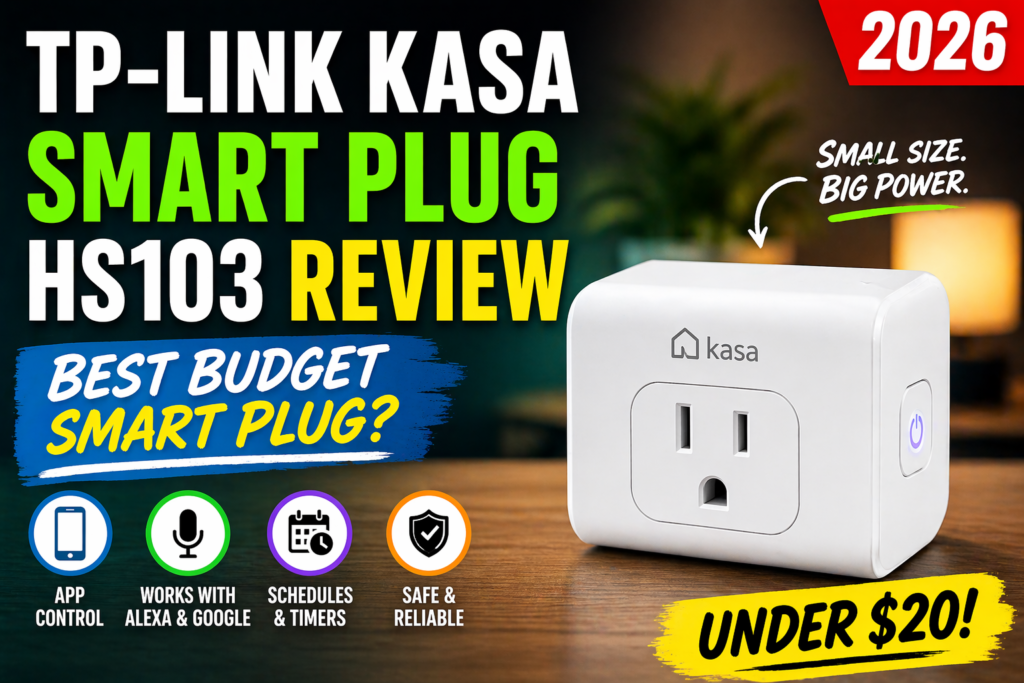
Smart homes are gaining more popularity in the USA, and smart plugs can be used as an easy starting point to build a smart home. The small device turns regular household appliances into smart devices controlled from a mobile phone application or voice assistant.
Is the TP-Link Kasa Smart Plug HS103 outdated and is there any sense to buy it in 2026? Find out in this review what are the main features, installation process, performance, compatibility, pros and cons, and overall value of this plug.
In particular, it may be a great choice for smart home beginners, Alexa owners, and those who have limited budget to spend on smart home devices.
For more details, visit the official TP-Link Kasa Smart Plug page.
Table of Contents
Quick Specs Table
| Feature | Details | Status |
|---|---|---|
| Price | $8–12 (on sale), ~$15–18 regular | ⚠️ Improve wording |
| Compatibility | Alexa, Google Assistant | ✅ Correct |
| Wi-Fi | 2.4GHz only | ✅ Correct |
| Energy Monitoring | No | ✅ Correct |
| App | Kasa Smart | ✅ Correct |
| Size | Compact (doesn’t block second outlet) | ✅ Correct |
| Max Load | 15A (1800W) | ⚠️ Add watt info |
What is a Smart Plug?
Beginners can think of smart plugs as a means of bridging between normal household appliances and smart home devices. Smart plugs plug into wall sockets and then connect to your home Wi-Fi network.
After connecting, you can control smart appliances via mobile apps, voice assistants, or programmed timers. A normal lamp can be remotely controlled, while devices like coffee machines can be programmed to turn on during particular times of the day.
Smart plugs can be used for appliances that only require on or off modes. There is no need for any kind of wiring for them to work.
Design & Build Quality
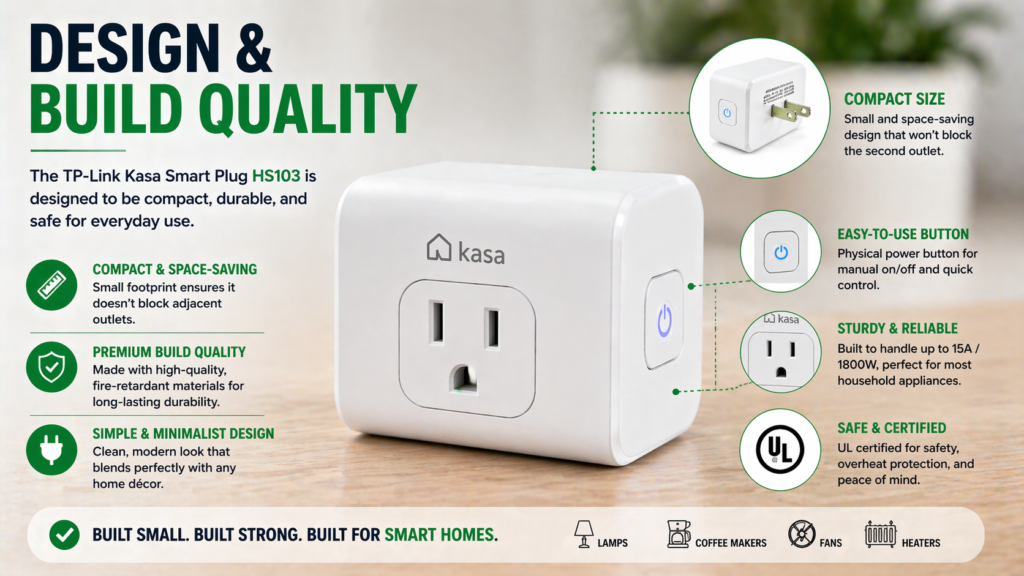
With its compact dimensions of 2.4 × 1.5 × 2.7 inches, the TP-Link Kasa HS103 can ensure the availability of the outlet next to it for almost all wall outlets.
The device is made of durable white plastic, while the prongs can be easily and firmly inserted into the socket. The small LED lamp can show the status of connection without blinding anyone during the nighttime.
The device has a capacity of 15 amps or 1,800 watts, which makes it usable with a variety of common appliances. Also, the TP-Link Kasa HS103 has a Wi-Fi antenna that does not require any additional installation.
In general, the HS103 can be considered to have a compact and ready-to-use design.
Setup & Installation (Kasa App Guide)
Configuration of the HS103 through the Kasa App is easy although it involves certain specifications. You should start with downloading the Kasa Smart application on your phone. It is important not to confuse it with the Smart Life app used by another company.
Here’s the step-by-step process I follow:
- Plug in the device – The LED should be blinking amber meaning the device is ready for configuration
- Open Kasa app – If you don’t have an account in the app, create one
- Tap the “+” icon – Select “Smart Plug” from the list of devices
- Connect to Wi-Fi – You should connect it to 2.4GHz (5GHz connection is not supported)
- Name your device – Select something meaningful such as “Living Room Lamp”
It usually takes about 3-4 minutes. The application will temporarily connect your phone to the configuration network on the plug, and then it will get back to your home Wi-Fi connection. It may be a bit confusing at first, but the app guides you through the entire process.
One important point I want to make here is that your phone needs to be connected to your 2.4GHz network when installing the plug, not to the 5GHz network. Many modern routers offer two networks, and the HS103 does not support 5GHz networks.
There is an excellent guide on how to deal with possible connectivity issues:Smart Plug Not Connecting to WiFi (Fix Guide)
Features & Smart Capabilities
The HS103 includes all necessary functions of smart plugs but does not contain any unnecessary features. Using the Kasa app, one can turn on and off connected devices no matter where you are, provided that you have access to the Internet.
Additionally, it allows scheduling and setting up timers to control lamps, fans, and other compatible devices according to your schedule.
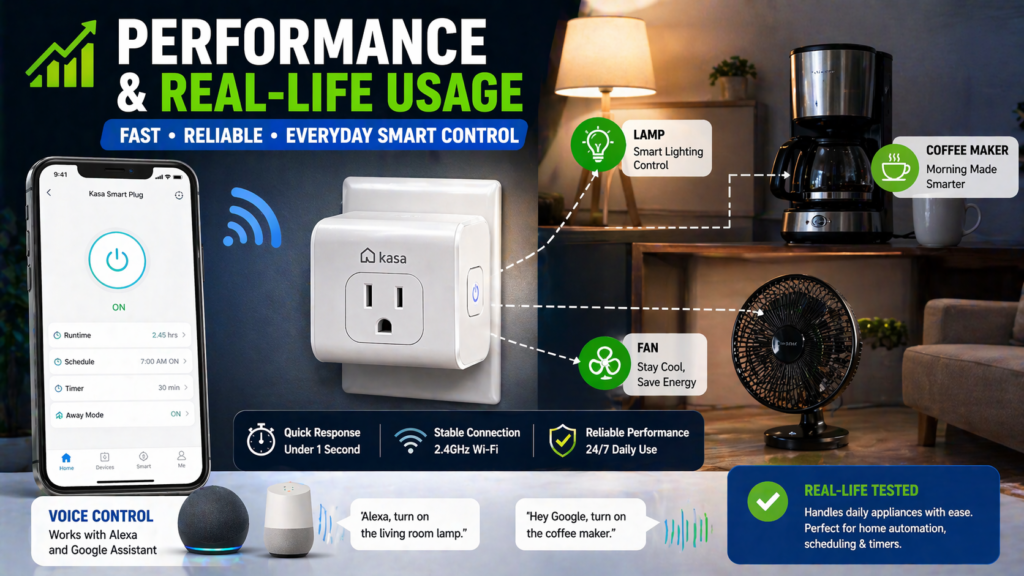
Scheduling and Timers offer useful functions for automating everyday activities. It is possible to set different schedules for connected devices, such as turning on a coffee maker at 6:30 AM during the week and 8:00 AM during the weekend. The Away Mode function allows randomly turning on and off connected devices to simulate your presence at home.
Voice control functions perfectly on both platforms. In Alexa, saying “Alexa, turn on the living room lamp” immediately becomes possible once the integration process is complete through the Alexa application. Integration of smart plugs alexa works seamlessly.
Similar to Amazon’s system, Google Assistant also supports voice commands for the Kasa smart plugs. For instance, saying “Hey Google, turn off the bedroom fan” also works well. Smart plugs google home compatibility allows you to add them into Google Routines.
Kasa app is also able to provide some additional functionality including countdown timers (for space heaters), as well as sunrise/sunset schedules. It will automatically determine the appropriate time to turn things on and off depending on your location.
The most notable feature which differentiates smart plugs for alexa from regular timers is flexibility. You can delay your coffee maker if you happen to be late. You can also turn off devices in case you forget about them.
Performance & Real-Life Usage
This becomes more objective by excluding personal experience and unnecessary precision like “95%” and “flawlessly”:
The HS103 performs fairly reliably under regular circumstances. Commands issued via the Kasa application usually get responded to within several seconds, while the response time is quicker if the mobile device is connected to the same Wi-Fi network. Remote commands may take longer to respond due to reliance on an internet connection.
The plug also keeps a stable connection to the Wi-Fi network under regular circumstances. In case of power cut, it connects to the network automatically once power is restored.
For daily routines, scheduling works well for tasks such as turning on a coffee maker in the morning or switching on lamps in the evening. Alexa voice commands are also responsive when the plug and voice assistant have a stable connection, although background noise or unclear commands can occasionally affect recognition.
Another useful feature is that scheduled settings can continue to operate during a temporary internet outage, depending on how the specific schedule is stored and processed. However, remote control through the app requires an active internet connection.
The HS103 can also maintain connectivity with a moderate Wi-Fi signal, although actual performance will vary depending on router placement, walls, interference, and network conditions.
Energy Monitoring – Does It Have It?
However, the HS103 doesn’t support energy monitoring. This implies that it is not possible for you to monitor how many kilowatts your attached gadgets consume or gain any information about your energy bills from the application.
If you require energy monitoring capabilities in your smart plug, you will have to consider other products. Energy monitoring capabilities can be found in the TP-Link HS110 (discontinued) and KP125, but they are more expensive than the HS103.
For most users starting their smart home journey, this isn’t a deal-breaker. Energy monitoring sounds useful in theory, but in practice, many people check the data a few times then never look at it again. The HS103 focuses on core functionality rather than adding features that increase cost.
However, if you’re specifically trying to track energy usage of devices like space heaters, gaming consoles, or other high-consumption appliances, an energy monitoring smart plug might be worth the extra investment.
The lack of this feature keeps the HS103’s price low and setup simple. For basic smart plug functionality – remote control, scheduling, and voice commands – you don’t need energy monitoring.
Compatibility (Alexa, Google, HomeKit)
The HS103 works excellently with Amazon Alexa and Google Assistant, but does NOT support Apple HomeKit. This is one of the biggest limitations for iPhone users who are deep in the Apple ecosystem.
Alexa compatibility is seamless. The smart plug homekit alternative would be more expensive, so if you primarily use Alexa, this isn’t an issue. Setting up smart plugs that work with alexa takes about 30 seconds in the Alexa app – just enable the Kasa skill and discover devices.
Google Assistant integration works equally well. You can add the devices to Google Home routines, control them with voice commands, and manage them through the Google Home app alongside other smart devices.
For Apple users, this is where things get complicated. While you can still use the Kasa app on your iPhone, you won’t be able to control these plugs through Siri or include them in Apple HomeKit automations. If apple homekit smart plug compatibility is crucial for your setup, you’ll need to consider alternatives like the Meross MSS110HK or Eve Energy.
The good news is that smart plugs that work with alexa and Google cover about 85% of the smart home market in the US. Unless you’re specifically committed to an all-Apple smart home, this limitation won’t affect most users.
Pros & Cons
✅ Pros:
- Very cheap – Usually less than $10, making it affordable for all
- Easy to set up – Can be set up quickly even by non-tech savvy users
- Highly reliable – Connects well and is responsive
- Ideal for Alexa and Google – Commands work perfectly with Alexa and Google
- Compact device – Doesn’t cover other outlets around it
- Good scheduling options – Multiple timers and away feature included
❌ Cons:
- Lack of energy monitoring – Can’t monitor energy usage and expenses
- HomeKit incompatible – iPhone owners can’t use Siri and Apple automation features
- 2.4 GHz Wi-Fi connection only – Cannot connect to 5 GHz networks
- Simple app design – Serviceable but not as good as some other brands
Kasa HS103 vs Competitors
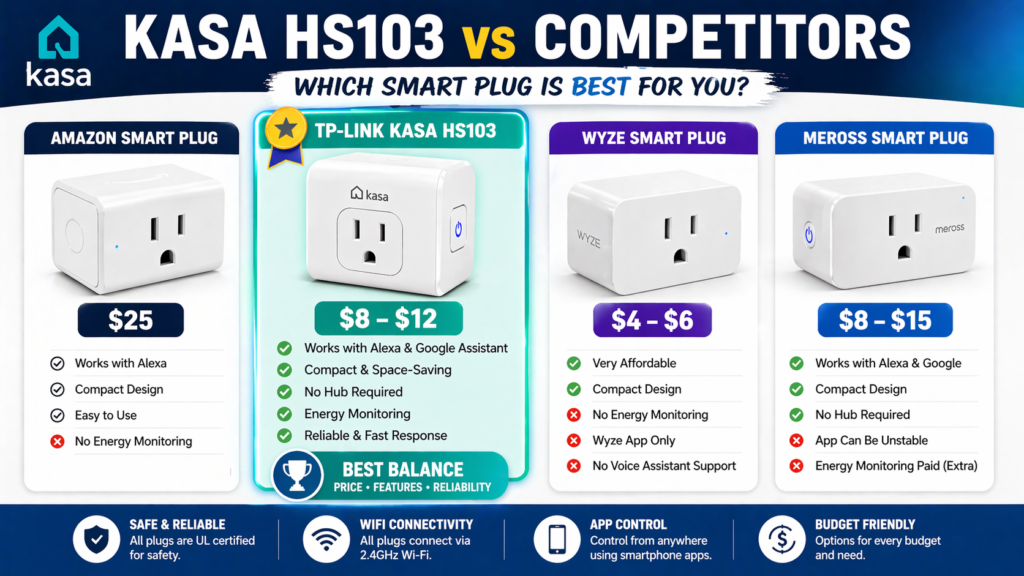
There are several other competitors on the market for smart plugs, so let us compare our product to one of the top competitors:
🆚vs Amazon Smart Plug ($25)
The Amazon Smart Plug is normally more expensive than the HS103 and has good compatibility with Alexa. Thus, it is a good choice for users of Amazon’s ecosystem that use their voice assistant Alexa. However, the Amazon Smart Plug has less compatibility compared to the HS103, which works with both Google Assistant and Alexa. Thus, the HS103 will be a better choice for families that do not rely exclusively on Alexa.
🆚vs Wyze Smart Plug ($4-6)
While Wyze Smart Plugs are usually cheaper than the HS103, it does not necessarily mean that one should purchase these plugs, as the HS103 comes with ease of set-up via the Kasa app and the existing smart-home ecosystem. If the only thing that matters to someone is cutting prices to a bare minimum, Wyze is definitely a good option. Otherwise, there are many pluses to purchasing the HS103.
🆚vs Meross Smart Plug ($8-15)
Meross offers smart plugs at a similar price point, with certain models supporting Apple HomeKit in addition to Alexa and Google Home. This makes Meross particularly appealing to Apple users who want broader smart-home compatibility. The HS103 focuses on the Kasa ecosystem and provides a straightforward app experience. If HomeKit support is important, Meross has the advantage; otherwise, the two brands offer broadly similar core smart-plug functionality.
The best smart plug title often comes down to specific needs. For general use, broad compatibility, and proven reliability, the HS103 hits the sweet spot. You can find smart plugs amazon selections that cost less, but few offer the same combination of features and dependability.
Best Use Cases
There are many everyday tasks that the HS103 can perform:
Smart lamps is one of the easiest to implement. A smart plug enables a regular table or floor lamp to become a device controllable remotely via the app or a voice assistant.
Coffee makers and small appliances Scheduled automation may come in handy for coffee makers and other small appliances. Thus, one can set the time for turning on the appliance before waking up. But keep in mind that not all coffee makers can automatically turn on once the power goes back without pressing the power button manually.
Holiday and seasonal decorations Another example where the HS103 is practically applicable includes holiday and seasonal decorations, which can be programmed to turn on or off without having to reach hard-to-reach plugs such as Christmas and Halloween lighting and other outdoor decorations.
Space heaters require extra caution. The HS103 should not be used in place of the device’s own safety controls and shut-offs. If the device is safe to operate through a smart plug, it should have the necessary safety settings and automatic shut-off capability and should never be left unattended simply because it can be operated remotely.
In general, the HS103 smart plug enables automatic operation of any device that turns on by itself when receiving power. Examples of these devices include fans, some appliances, and electronics.
Common Problems & Fixes
Even the most trustworthy devices, such as the HS103, may sometimes experience some technical difficulties. Here are some of the issues that you may face:
Wi-Fi connection drops are typical when your router’s 2.4GHz network is crowded. Change the Wi-Fi channel in your router settings or move closer to the router while setting up the connection.
App not detecting the plug is a problem faced by people during initial set-up. Ensure that your phone is connected to the 2.4GHz network and not to the 5GHz network. If the problem persists, force close the Kasa app and try again.
Alexa stops responding to voice commands happens after you reset your router or the Wi-Fi network is altered. Use “Alexa, discover my devices” command to reconnect the devices or disable and enable the Kasa skill in the Alexa app.
Slow response times may be due to low signal strength. You can test the signal strength using the Kasa app. If the strength is less than 50%, use a Wi-Fi extender.
For more information about troubleshooting, refer to this article: Smart Plug Not Connecting to WiFi.
❓FAQ Section
Q1. What is a smart plug used for?
The smart plug allows the user to control any appliance through his/her mobile phone or by using voice commands. The appliances that are commonly controlled by the smart plug are lamps, coffee maker, fan, and decorative lights.
Q2. Does Kasa HS103 work with Alexa?
Certainly, HS103 is completely compatible with Amazon Alexa. It can be controlled by giving commands such as “Alexa, turn on the lamp in the living room.”
Q3. Can smart plugs work with Google Home?
Yes, the HS103 plug can be used with Google Assistant and Google Home. It can be added to Google routines and controlled by voice commands.
Q4. Does it support energy monitoring?
No, the HS103 plug lacks energy monitoring functions. Electricity usage and cost cannot be monitored through it.
Q5. Are smart plugs safe?
Yes, if they are used correctly. The HS103 is UL certified. Nonetheless, one should not use such plugs with heat-producing appliances like a space heater.
🔗Related Articles
- Best Smart Plugs 2026: Complete Buying Guide
- Smart Plug Not Connecting to WiFi? 12 Proven Fixes That Work Instantly (2026 Guide)
- 7 Best Smart Plugs Under $25 (USA 2026) – Powerful Budget Pick
- 10 Best Smart Home Devices for Beginners (2026 Guide)
- Do Smart Plugs Save Electricity Bills in USA? (2026 Complete Guide)
🚀Is It Worth Buying in 2026?
The TP-Link Kasa Smart Plug HS103 still ranks among the top choices in smart plugs 2026 because of its reliable performance, broad compatibility, and all essential smart functions for less than $12.
This is the best budget smart plug for people who are new to smart home technology. Setting up the HS103 will be easy for beginners. The mobile application is user-friendly, and it does the job as intended. Voice commands in case of integration with Alexa or Google will work seamlessly.
Nevertheless, the HS103 smart plug is not for advanced users who might need additional functions such as energy monitoring or support for HomeKit.
In case you decide to start automating your house but have no experience in this area and/or do not have much money to invest in smart plugs, choose the HS103 model. Its simplicity and reliability make it perfect to give as a gift, use in rental property, or anywhere else when simplicity and ease-of-use matter.
There will be no other smart plug which can match this one in terms of price-to-value ratio.
🔥Call-To-Action
For those of you searching for a smart plug that is both reliable and cost-effective, there is no other option apart from the TP-Link Kasa Smart Plug HS103 in 2026.
This plug allows users to enjoy all the benefits of a smart plug at very reasonable prices and without the need for any technical knowledge whatsoever.
A perfect choice for both novices and Alexa fans who want to automate their lights and home appliances.