
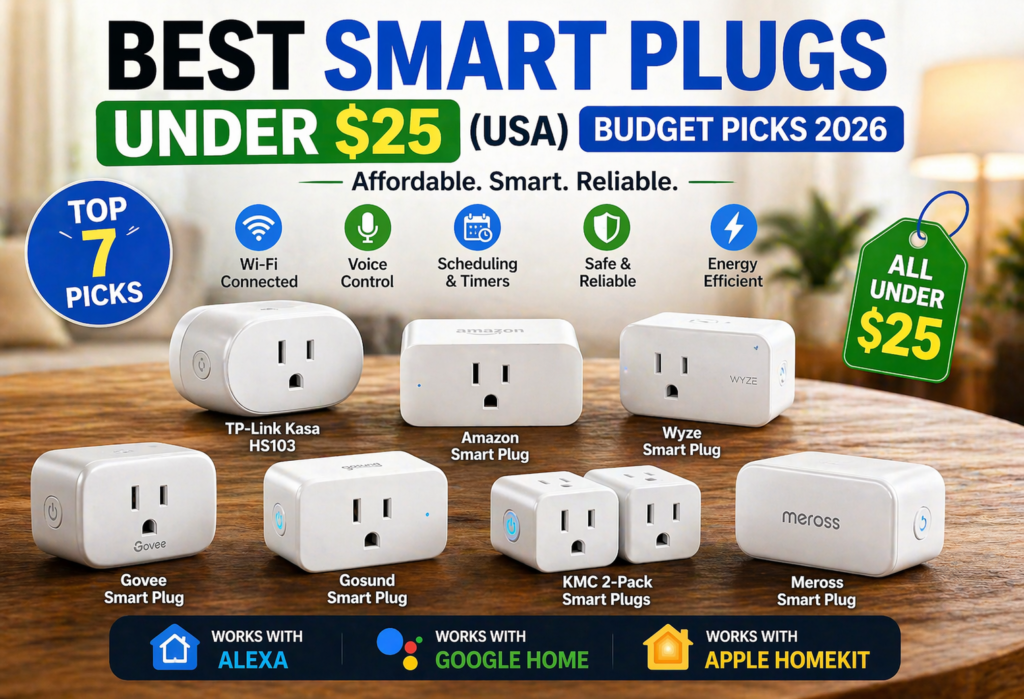
7 Best Smart Plugs Under $25 show that you do not have to break the bank to create an intelligent house. These economical smart plugs allow you to operate any light bulbs, coffee machine, fans, or even other electronic devices from your phone or voice assistant.
Budget smart plugs usually have Wi-Fi connection, scheduling, timer settings, remote control, and compatibility with Amazon Alexa, Google Assistant, and Apple HomeKit. They are easy to use and simple to set up, plus one of the easiest methods to automate your household.
Here, you will learn about the best smart plugs under $25, compare them, and choose the one that suits you.
Table of Contents
Quick Comparison Table
| Product | Typical Price (USD) | Compatibility | Energy Monitoring | Best For |
|---|---|---|---|---|
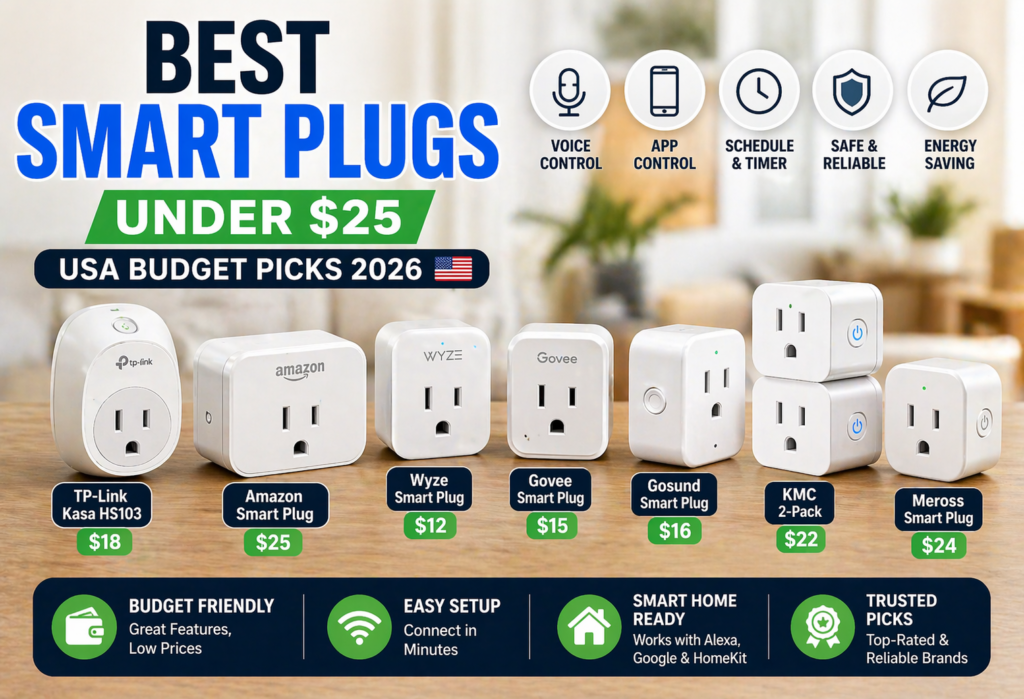
| TP-Link Kasa HS103 | $15–$20 ✅ | Alexa, Google | No | Overall best choice |
| Amazon Smart Plug | $20–$25 ⚠️ | Alexa only | No | Alexa users |
| Wyze Smart Plug | $10–$15 ✅ | Alexa, Google | No | Budget buyers |
| Govee Smart Plug | $13–$18 ✅ | Alexa, Google | No | Beginners |
| Gosund Smart Plug | $12–$18 ✅ | Alexa, Google | No | Value seekers |
| KMC 2-Pack | $18–$25 ⚠️ | Alexa, Google | No | Multiple rooms |
| Meross Smart Plug | $20–$28 ⚠️ | Alexa, Google, HomeKit | No | iPhone users |
👉 “Prices may vary depending on ongoing Amazon deals and availability in the USA.”
7 Best Smart Plugs Under $25 (USA Picks 2026)
🔌TP-Link Kasa Smart Plug (HS103/HS105)
TP-Link Kasa Smart Plug is the best choice overall among the smart plugs below $25. It provides great performance, reliability and price combination.
It has such features as Wi-Fi, remote control, schedule, timer, and works great with Amazon Alexa and Google Assistant. Moreover, its app is very user-friendly and will allow you to automate processes without any difficulties.
With its small form factor, it will leave one additional outlet open, and Wi-Fi connection will provide reliable daily performance. With the price of approximately $15-$20, it is one of the best budget smart plugs.
🔌Amazon Smart Plug
Amazon Smart Plug is the best choice for Alexa users due to its easy installation and perfect fit into Echo gadgets.
This gadget has voice control, scheduling, timers, and remote control via Alexa App capabilities. It takes a couple of minutes to install it, and no extra hub will be needed.
Do not forget that Amazon Smart Plug is compatible with Amazon Alexa only and cannot work with Google Assistant or Apple HomeKit. It can be purchased for about $20-$25.
🔌Wyze Smart Plug
The Wyze Smart Plug is arguably one of the most affordable smart plugs, giving you a lot of bang for your buck at about $10-$15.
This plug works with Amazon Alexa, Google Assistant, remote control, scheduling, timers, and vacation mode using the convenient Wyze app. Its slim profile and strong Wi-Fi connection make it perfect for home automation needs.
If you are trying to get into home automation on a budget, Wyze Smart Plug should be on your list.
🔌Govee Smart Plug
The Govee Smart Plug would be an ideal choice for beginners because of the ease of installation and user-friendly Govee Home application.
Wi-Fi connectivity, scheduling, timing, and voice command using Amazon Alexa and Google Assistant are features that come with the smart plug. It will connect quickly and will give you satisfactory performance.
The plug is priced somewhere between $13 to $18.
🔌Gosund Smart Plug
Gosund Smart Plug provides an exceptional feature set at a price point that is reasonable and reliable enough to attract many smart home enthusiasts on a budget.
By using the Smart Life app, this smart plug allows remote control, scheduling, countdown timers, and other automation capabilities. This device also works perfectly well with Amazon Alexa and Google Assistant.
With a cost ranging between $12-$18, Gosund Smart Plug is a great product that you can choose to get your smart home expanded without any budget problems.
🔌KMC Smart Plug (2-Pack Value)
One of the most cost-effective ways to add smart home capabilities to several devices is through the KMC Smart Plug 2-Pack.
These plug-in devices are compatible with Amazon Alexa and Google Assistant and can be operated remotely using the Smart Life app and feature scheduling and timers.
They are durable everyday devices and great for use with lamps, fans, Christmas tree lights, and many more devices.
Priced at $18-$25 for two smart plugs, this 2-pack is a valuable buy.
🔌Meross Smart Plug (HomeKit Option)
If you want to use the best HomeKit devices at affordable prices, the Meross Smart Plug is one of the best products to get.
Besides being compatible with Apple HomeKit, it can be used with Amazon Alexa and Google Assistant. The Meross Smart Plug comes with features like remote control, scheduling, timers, and automation via app.
It costs between $20-$28 and is the ideal gadget for iPhone users who need affordable but effective HomeKit compatibility.
How to Choose the Best Smart Plug (Buying Guide)
Picking the proper smart plug may appear easy at first glance, but a few critical points will make the difference between a fantastic experience and a bad one. Here is a rundown of what really makes a difference when using such a gadget in reality.
Compatibility is everything.You should first identify which type of voice assistant you use the most before choosing any smart plug. Any Alexa plug would work well for Alexa households. Similarly, Google Home owners have numerous models to choose from. However, iPhone owners looking for HomeKit support will be limited in their choices.
Wi-Fi requirements are crucial but often overlooked. All smart plugs require 2.4GHz wifi networks and don’t function with 5GHz ones. That’s where many users face difficulties while setting up. Please check your router settings. Most routers provide access to both types of wifi networks, but you must connect your smart plug to 2.4GHz.
App quality varies dramatically.A smart plug cannot be used without an app. It is better to opt for reputable companies with reliable applications such as Kasa, Smart Life, Alexa, and Google Home as these apps provide easy setup, frequent updates, scheduling, and consistent remote controls. Unknown brands with poor maintenance apps may not have enough features.
Build quality and safety matter more than you think. Smart plugs certified by UL or FCC listing are safe to use in the USA as they have passed relevant tests. Low-budget smart plugs that are not certified are cheaper yet they may cause fire hazards and may harm your devices.
Energy monitoring is a nice bonus that can help you monitor how much electricity your devices consume. However, most smart plugs with energy monitoring feature cost more than $25, hence the need for more expensive smart plugs. For basic smart home operation, this feature is unnecessary.
Smart Plug Features Explained
Knowing the actual functionality of smart plugs can be useful when buying one. Here is the explanation of the functions.
Voice Control makes your life easier. Instead of getting out of your seat and turning off the lamp with your hands, just order “Alexa, turn off the living room light.” It might seem weird at first until you get used to it. Alexa and Google Assistant both work with most of smart plugs, using only slight differences in commands.
Scheduling & Automation is the function that brings you a lot of advantages. You can set up your coffee maker to begin working every morning at 6:30 AM or switch on the lamps automatically in the evening. I use the scheduling for seasonally decorating my house. Holiday lights go on at 5 PM and off at 11 PM without any daily actions from me.
Energy Monitoring monitors the amount of electricity used by any device plugged into the socket. Although some cheap plugs lack such a function in order to save money, it is important in the determination of the appliance that consumes the most electricity and could be replaced with an efficient one.
Remote Control allows you to control your devices even when you are away as long as you have internet access. Forgetting to switch off the space heater before going on a holiday trip is no longer a problem. With the Remote Control function of the smart plug, you have nothing to worry about.
Best Use Cases for Smart Plugs
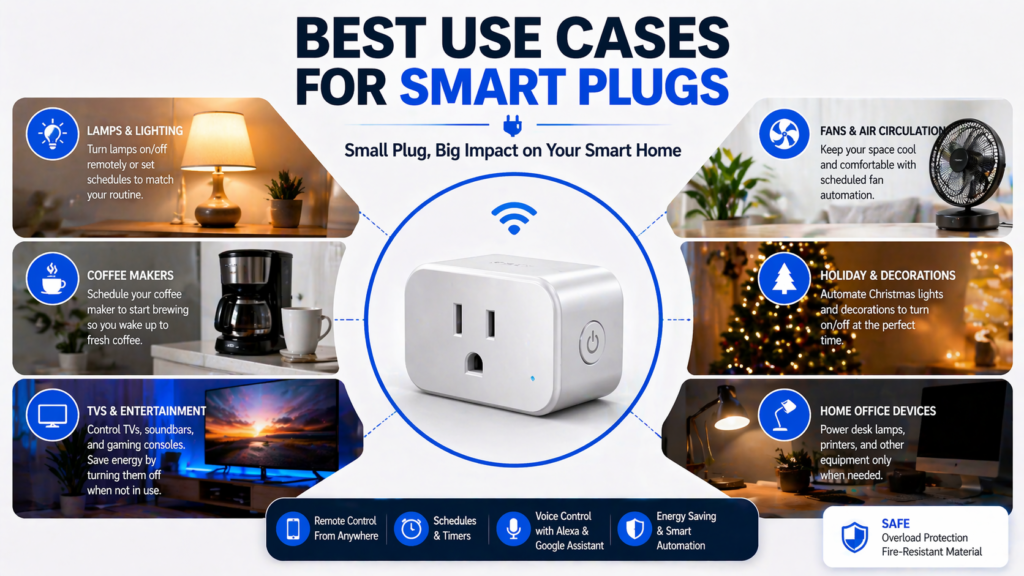
Smart plugs are most efficient when used with household devices that use an actual switch to turn on/off the device. Some of the most effective smart plug applications include:
Lamps & lighting are one of the best applications for smart plugs. All kinds of lamps are great to use with smart plugs as you can create atmosphere with your voice command, program schedules, and never have to worry about falling over while searching for the switch ever again. Smart plug for lamp control is perhaps the most satisfying first smart home purchase.
Coffee makers represents an example of a perfect smart plug application. It is very cool feeling waking up and having already brewed coffee programmed into your coffee maker the night before. However, keep in mind that it is necessary for your coffee maker to have an actual switch that will stay in “on” position.
TVs & entertainment systems are suitable for smart plugs; however, the newest TV models usually have some smart plug features built-in. One advantage of using a smart plug for TV is the ability to reduce phantom energy.
Space heaters require extreme caution. Although some individuals use a smart plug for their space heaters, this may pose risks if the heater uses more wattage than the smart plug can handle safely. When using a smart plug for a space heater, ensure that the heater does not exceed the maximum power load.
Outdoor applications Holiday lights, water features, and other kinds of lighting can be automated. Unfortunately, indoor smart plugs cannot withstand bad weather conditions. You will thus have to use a specific outdoor smart plug.
Safety Tips
Safety should not be overlooked with respect to smart plugs, but unfortunately most consumers tend to neglect this aspect. Please don’t be among them.
Maximum wattage cannot be ignored. Every smart plug is rated for maximum wattage which is typically about 1,500 watts or 15 amps. Exceeding the limit may lead to over-heating and fires, not to mention device failure. It’s very common for high-powered devices such as space heaters, hair dryers, and microwaves to use more energy than a smart plug is designed to handle.
UL listing matters in the USA. Find out if your smart plug is UL listed. This means that the device is certified for safe use in electricity terms. Even though UL-listed devices tend to be more expensive, they are definitely worth it.
Don’t daisy-chain or overload.Connecting your power strip to your smart plug and then plugging high-power devices is dangerous and causes fires. The smart plug operates efficiently when used with one device and medium power.
Keep water away. TThis may seem like an obvious precaution, but smart plugs located near sinks, bathrooms, or outdoors (if they are not designed for use outdoors) pose dangers. Electricity and water do not mix well, and smart plugs add electronics to the equation.
Consider your home’s electrical system. Houses built before 1970 have older wiring and might be unsafe in combination with smart plugs and high-powered devices. If you have such a house, you should consult an electrician regarding your electrical system.
How to Set Up a Smart Plug (Step-by-Step)
Getting your smart plug configured right from the beginning will save you hours of troubleshooting. Here is the method that usually works:
Start with the physical connection. Plug your smart plug into an electric socket close to your wifi router. At this point, do not plug your actual device into the smart plug.
Download the correct app. It varies depending on the brand of your smart plug. TP-Link smart plugs use the Kasa app, other brands like generic ones use Smart Life, Amazon smart plugs use Alexa. Do not download some apps from unverified sources – there are many smart home fakes out there.
Connect to your wifi network. using the app. In most cases, you have to connect your phone to a wifi network provided by the smart plug and enter your home wifi password. Remember, 2.4GHz is better than 5GHz.
Test basic functionality. Before attaching your gadget, ensure that the smart plug follows your commands from the app. The LED light should change color depending on whether you pressed the on/off button from the application.
Add voice control. If you wish to have control from Alexa or Google Home, activate the skill of the corresponding voice assistant application. In most cases, account linking is necessary for both apps.
Connect your device and name everything clearly. Connect your target gadget and use a specific name for your smart plug such as “living room lamp” instead of names like “smart plug 1.”
Common Problems & Fixes
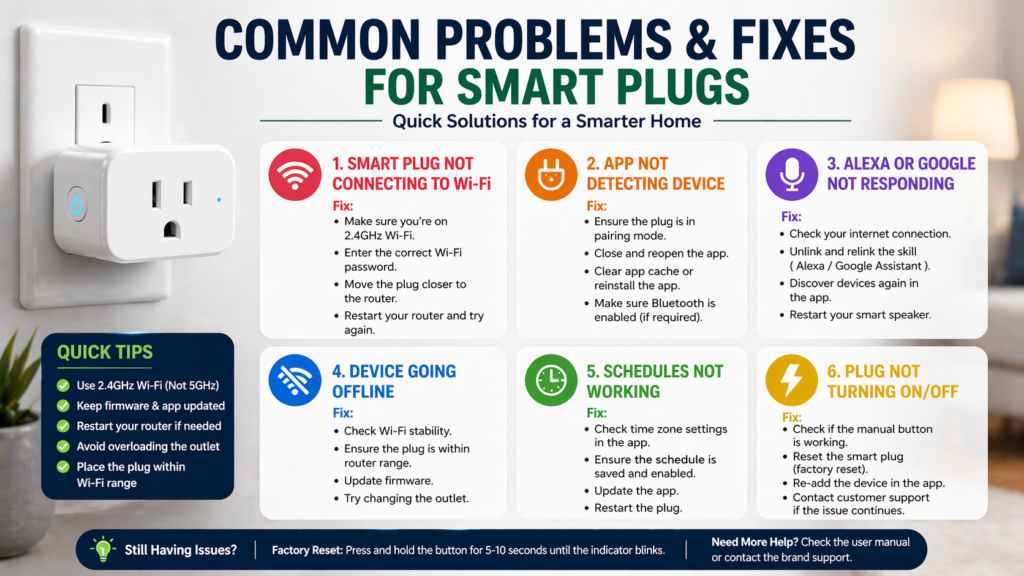
Not even the best smart plugs are always functioning properly. Let’s take a look at the most common problems and their solutions.
Smart plug not connecting to wifi First, make sure that you’re trying to connect to the 2.4GHz channel – smart plugs cannot connect to 5GHz networks. During setup, get closer to your router as bad signal strength causes connection issues. Otherwise, you should restart your router and reset the smart plug to its default settings.
App not detecting device means there are some problems with pairing. Check whether both your phone and smart plug are connected to the same WiFi during setup. Sometimes, the app requires permissions to get your location to detect the device.
Alexa not responding to voice commands usually indicates that the smart plug skill is not linked to your account properly. Go to the Alexa app, navigate to Skills & Games, locate your smart plug skill and link your account to it. Just asking Alexa to “discover devices” can also solve recognition issues.
Device going offline unexpectedly implies wifi connection problems. Weak wifi signal strength may cause your device to lose connection if your network gets overloaded. You should try moving your router closer to the plug or use a wifi extender.
Smart Plug vs Smart Outlet
The distinction between smart plugs and smart outlets will help you to pick the most appropriate solution for various scenarios.
Smart plugs are portable devices that should be plugged into the regular outlet. It is great for people who rent their flats, move often, or simply want to try the smart technology without permanent installation. In case you change your mind about moving, you will be able to simply unplug your device.
Smart outlets are built-in replacements for standard wall outlets. It requires additional installation but provides a more aesthetic appearance and cannot be unplugged accidentally. Nevertheless, you will either have to have some basic knowledge of electricity or find an electrician.
For beginners, smart plugs are clearly better. They cost less money, don’t need any installation, and give you a safe opportunity to try out the capabilities of smart home automation. In case you love what, you’ve tried, you can always replace them with smart outlets in the future.
Smart outlets make sense for permanent installations in living areas where aesthetics become important, and you do not want your plugs to look untidy. In addition, they cannot be unplugged accidentally.
Are Cheap Smart Plugs Worth It?
The question keeps coming back, and its answer is dependent on what you need specifically.
Yes, cheap smart plugs are absolutely worth it and will provide everything you need to manage simple devices like lamps, decor lighting, coffee machines, and others of low power consumption. They contain everything that’s needed for $25 or less – wireless connection, phone control, integration with voice assistants, and scheduling. There isn’t much else in expensive smart plugs.
However, avoid cheap smart plugs for heavy appliances such as space heaters, air conditioners, and even power tools. These machines need quite an amount of power and will be heating, which might prove too much for cheap smart plugs.
The best use cases for budget plugs come in handy when it comes to seasonings, bedside lamps, entertainment hubs, and kitchen gadgets. These devices will not strain the electrical system in the smart plug, and they will be greatly benefited by the smart functionalities of the plug.
There is little to no difference between a cheap and an expensive smart plug apart from the apps on the expensive model and some slight improvement in the electrical performance of the latter.
🔗 Helpful Resources
- Download the official Alexa app from the Amazon website.
- Visit the official Amazon support page for setup & troubleshooting.
- Learn how to fix WiFi issues with this guide from Federal Communications Commission.
- Do Smart Plugs Save Electricity Bills in USA? (2026 Complete Guide)
🧾FAQs
What is a smart plug?
Smart plugs are gadgets that connect to the usual sockets in your walls and add wi-fi capability to the devices you plug into them. This way, you’ll be able to control them using your smartphone, voice commands, and even schedules.
Do smart plugs work with Alexa?
Absolutely! Most smart plugs will work with Alexa. All you need to do is activate the correct skill within the Alexa app and tie your smart plugs’ account to Alexa.
Can I use smart plugs with Google Home?
Absolutely. Most smart plugs support Google Assistant integration through the Google Home app. The setup process is similar to Alexa – you’ll link your smart plug app account with Google Home and can then use voice commands like “Hey Google, turn off the coffee maker.”
Are cheap smart plugs safe?
Budget smart plugs can be safe if they’re properly certified and used correctly. Look for UL listing in the USA and stick to reputable brands. Avoid using any smart plug with high-power appliances that exceed its wattage rating, and never buy uncertified devices from unknown manufacturers.
Do smart plugs increase electricity bill?
Smart plugs themselves use very little electricity – typically 1-2 watts when idle. However, they can actually reduce your electricity bill by eliminating phantom power draw from devices in standby mode and making it easier to turn off forgotten appliances. The convenience often leads to better energy habits.
🔗Related Articles
- Best Smart Plugs 2026: Complete Buying Guide
- Alexa vs Google Assistant: Smart Home Comparison
- Smart Home Security: Protecting Your Connected Devices
- 10 Best Smart Home Devices for Beginners (2026 Guide)
- TP-Link Kasa Smart Plug HS103 Review (2026) – Powerful Budget Smart Plug Worth Buying?
🏁Conclusion
Of all the smart plugs under $25, the TP-Link Kasa HS103 is the best of the lot because of its consistency in performance, great app usability, and compatibility with Amazon Alexa as well as Google Assistant. If you are completely aligned with the Amazon ecosystem, then the Amazon Smart Plug is highly recommended, whereas the Wyze Smart Plug is a great option for cost-effective users.
No matter what smart plug you use, this will definitely be one of the easiest and cost-effective means of starting with a smart home system. All this can be done without doing anything about your current wiring and without the need for any technical skills.
Begin with one or two smart plugs to get started with your most used gadgets and then keep expanding your system. With many choices available that are reliable and come under $25, it is time to automate your home at a reduced cost.